

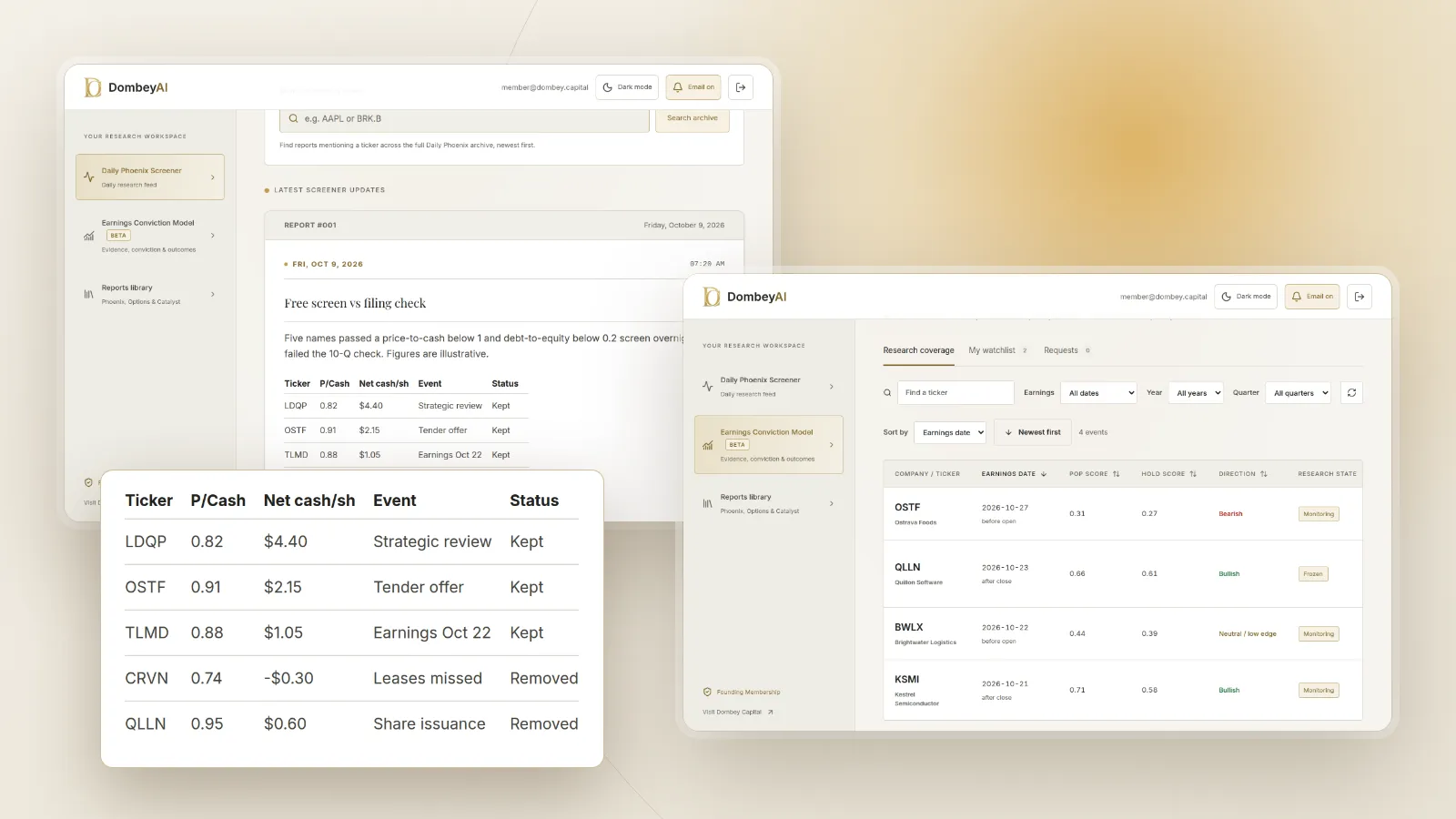


Full disclosure: Dombey Capital is our own research service and our top pick here, for the reasons below. The section on where it falls short is there so you can judge whether it fits your process.
What "free" means for a stock screener
Almost every screener in this list has a free plan. The differences sit in the limits, and those limits decide whether a free tool can do your job. Five matter most:
- Data delay. Finviz's free quotes are delayed by 1 minute. For value and event screens run once a day, that rarely matters.
- History. Free plans keep financial statements short, from 2 years on Koyfin to 5 years on TIKR. A screen on a five-year average needs at least five years behind it.
- Saved screens. Finviz allows 50 saved presets on its free plan. Koyfin allows 2 and TIKR 1. If you rerun several screens each week, this limit bites first.
- Results and export. Simply Wall St shows only the top 4 results per screen for free. Export to a spreadsheet is a paid feature almost everywhere.
- Coverage. Some free plans are US only. Global screens need Koyfin, Investing.com or TradingView.
This article compares what each free plan includes. If you already know you will pay, our list of Finviz alternatives compares the paid tiers, and our guide to the best stock screeners for value investors compares balance-sheet filters in detail.
Quick comparison
| Tool | Best for | Key features | Price (as of October 2026) |
|---|---|---|---|
| Dombey Daily Phoenix ScreenerTop pick | Special situations before a dated catalyst | Curated daily shortlist in the DombeyAI Portal, beside the Phoenix Report and Catalyst Briefing | Founding Membership $1,200/year; Standard Access $80/year or $8/month (no screener); Public Archive free |
| Finviz | The most complete free US screener | P/B, P/C, debt/equity, short float and earnings-date filters; 3 years of statements; 50 saved presets | Free; Elite $39.50/month or $299.50/year |
| TradingView | Chart-led screening | Eight filter categories, multi-region selection, 100 AI screener requests on Basic | Free Basic; paid from $12.95/month billed annually |
| Stock Analysis | A free screener with no sign-up | Screener tabs for valuation, financials, dividends and analysts | Free; Pro $9.99/month or $79/year |
| Koyfin | Global screens with a small free allowance | 5,900+ filter criteria, 100K+ global securities; free plan has 2 screens | Free; Plus $39/month and Premium $79/month billed annually |
| TIKR | A free fundamentals screen on US stocks | 5 years of history, 1 saved screen, 90 days of transcripts on free | Free; Plus $24.95/month to Ultimate $119.95/month |
| Yahoo Finance | Free ready-made screens | Most active, gainers, most shorted and undervalued large caps | Free; Bronze $95.40/year to Gold $479.40/year |
| Investing.com | The widest free global coverage | 160,000+ stocks, valuation, financial and technical filter groups | Free sign-up; Pro+ see the vendor's pricing page |
| Simply Wall St | Visual screens for newer investors | Snowflake-based screener; free plan shows top 4 results | Free plan; see the vendor's pricing page |
| SEC EDGAR full-text search | Free event screens on filings | All electronic filings since 2001, filtered by form type and date | Free |


How we compared these tools
We compared these tools from vendor documentation, pricing pages and public product pages read on October 9, 2026. We did not use paid accounts and make no claims about the results any screen produces. Where a vendor page did not state a free-plan limit, we say so rather than guess.
The weights favor what matters when you screen for special situations and dated catalysts on a free plan.
| Criterion | Weight | What it measures |
|---|---|---|
| Balance-sheet and value filters | 25% | Price-to-cash, price-to-book and debt filters available without paying |
| Catalyst and event awareness | 20% | Earnings dates, filing events or written context beside results |
| Free-plan limits | 20% | Saved screens, results shown, data delay and export on the free tier |
| Depth of history | 15% | Years of statements visible on the free plan |
| Coverage | 10% | US only or global listings |
| Cost of the next step | 10% | What the first paid tier costs if you outgrow the free one |
If you trade on technical signals, weight charting and data delay above balance-sheet filters, and TradingView moves to the top of the free tools. If you screen non-US stocks, weight coverage higher and Investing.com and Koyfin move up.
Quick picks by job
Best for special situations before a dated catalyst: Dombey Daily Phoenix Screener
The Daily Phoenix Screener is a shortlist, not a filter panel. Each trading morning it shows situations relevant to Dombey's coverage of special situations and dated catalysts. It is not free. Use it beside a free screener for your own ideas, or start with the free Public Archive to see how the research reads.
Best free US screener: Finviz
The broadest free filter set in this list, including price-to-cash, debt-to-equity and earnings date, with 50 saved presets.
Best for chart-led screening: TradingView
Screen, then open the chart. The free Basic plan includes 100 AI screener requests and 3 active price alerts.
Best free screener without an account: Stock Analysis
The screener loads without logging in, with tabs for valuation, financials and dividends.
Best for global screens with custom criteria: Koyfin
More than 5,900 filter criteria across 100,000-plus global securities, with 2 screens on the free plan.
Best free fundamentals screen with transcripts: TIKR
Five years of US financials, 1 saved screen and 90 days of earnings call transcripts at no cost.
Best ready-made free screens: Yahoo Finance
Prebuilt screens for most active, gainers, losers and most shorted stocks.
Best for the widest country coverage: Investing.com
More than 160,000 stocks from global markets on a free sign-up.
Best for newer investors: Simply Wall St
Visual screen results, though the free plan shows only the top 4.
Best free event screen: SEC EDGAR full-text search
Search every electronic filing since 2001 by keyword, form type and date.
Full reviews
1. Dombey Daily Phoenix Screener
What it does. The Daily Phoenix Screener is a research resource inside the DombeyAI Portal, updated each trading morning, that shows situations relevant to Dombey's coverage of special situations and event-driven equities. It sits beside the weekly Phoenix Report, weekly Options Research, the Biweekly Catalyst Briefing and the Earnings Conviction Model. It is a curated list, not a tool you configure.
Best for. Investors who want a daily shortlist of special situations with a catalyst ahead, rather than a blank filter panel.
Pricing. The screener is part of Founding Membership at $1,200 a year, billed annually, which also includes the weekly Phoenix Report, weekly Options Research, the Biweekly Catalyst Briefing, the Earnings Conviction Model, valuation and execution analysis, and priority access. Standard Access, the lower-cost option at $80 a year (about $6.67 a month) or $8 a month on monthly billing, includes the Biweekly Catalyst Briefing and the complete public-research archive but not the screener. The Public Archive is free.
Pros
- Starts from a short list tied to dated catalysts, not a blank panel.
- A name on the list can be followed into written research on the same situation.
- Every published thesis stays in the research archive.
Cons
- Not free; the screener is only on the highest tier.
- You cannot set your own filters.
- Coverage is limited to special situations.
Verdict: Our top pick for investors who screen for special situations before a catalyst. Pair it with Finviz or EDGAR for your own free screens.
2. Finviz
What it does. A fast screener for US stocks with descriptive, fundamental, financial, ownership, performance and technical filters. Value filters include price-to-book, price-to-cash and debt-to-equity; event and positioning filters include earnings date and short float. The free version shows quotes delayed by 1 minute, 3 years of financial statements and up to 50 saved screener presets.
Best for. Anyone who wants a full free screener for US stocks.
Pricing. Free. Elite is $39.50 a month or $299.50 a year and adds real-time quotes, 8 years of statements, unlimited presets, alerts and Excel or CSV export.
Pros
- The most complete free filter set in this list.
- Price-to-cash and debt-to-equity filters cover a first pass on balance-sheet screens.
- 50 saved presets is generous for a free plan.
Cons
- No export or alerts without Elite.
- Built around US listings.
- Three years of statements limits long-run screens.
Verdict: The default free screener for US stocks. Start here.
3. TradingView
What it does. A charting platform with a stock screener that filters on security information, market data, technicals, financials, dividends, valuation, growth and margins. It defaults to your local region and lets you select other markets, including several at once. The free Basic plan includes 100 AI screener requests, 2 indicators per chart, 3 active price alerts, and 7 years of annual and 8 years of quarterly financial data on charts.
Best for. Investors who screen and then go straight to the chart.
Pricing. Free Basic plan. Paid plans billed annually: Essential $12.95 a month, Plus $29.95, Premium $59.95 and Ultimate $199.95.
Pros
- Multi-region screening on a free plan.
- Charts one click from each result.
- Seven years of annual financials on the free tier is long for a free plan.
Cons
- Two indicators per chart on Basic is tight.
- Fundamental screening is secondary to charting.
Verdict: The best free choice if your screens end on a chart.
4. Stock Analysis
What it does. A free stock screener with tabs for general data, performance, analysts, dividends, financials and valuation, which loads without an account. Paid plans add more than 300 indicators in data tables, 10 to 40 years of financial history, saved screeners and downloads. The Pro page does not list the free plan's limits.
Best for. A quick screen without signing up.
Pricing. Free. Pro is $9.99 a month or $79 a year ($6.58 a month), with 1 download a day. Unlimited is $16.58 a month billed annually.
Pros
- No account needed to start.
- The lowest-cost paid upgrade among the full screeners here.
Cons
- Saved screens and long histories need Pro.
- The free tier's limits are not spelled out.
Verdict: A fast, no-friction free screener with a cheap upgrade path.
5. Koyfin
What it does. A data and charting platform whose screener lists more than 5,900 filter criteria across more than 100,000 global securities. The free plan includes 2 screens, 2 watchlists, 2 years of financials and 1 year of estimates, plus advanced charting and market dashboards.
Best for. Investors who screen global stocks and can work within two saved screens.
Pricing. Free. Plus is $39 a month and Premium $79 a month on annual billing; monthly billing is $49 and $110. Plus adds unlimited screens and 10 years of financials; Premium adds custom data and formulas.
Pros
- Global coverage and a deep criteria list.
- Good charts and dashboards on the free plan.
Cons
- Two screens and two years of financials on free.
- Custom formulas need Premium.
Verdict: The best free start for global screens, if two screens are enough.
6. TIKR
What it does. A fundamentals platform with a screener on every plan. The free plan covers US stocks only, with 5 years (8 quarters) of financials, 1 saved screen, unlimited watchlists and 90 days of transcript history, with no credit card required.
Best for. A free fundamentals screen on US stocks, with transcripts to read on the results.
Pricing. Free. Plus is $24.95 a month, Pro $54.95 and Ultimate $119.95 on monthly billing; annual billing is offered.
Pros
- Five years of financials on a free plan, more than Finviz or Koyfin.
- Transcripts next to the screen.
Cons
- One saved screen.
- US only on the free plan.
Verdict: Good for one recurring fundamentals screen.
7. Yahoo Finance
What it does. Free quotes, news and a set of ready-made screeners, including most active, day gainers, day losers, most shorted stocks and undervalued large caps, plus a custom screen builder. Many named screens, such as analyst strong buys and hedge fund holdings, link to the paid Gold plan.
Best for. Ready-made screens next to the news you already read.
Pricing. Free. Bronze is $95.40 a year, Silver $239.40 and Gold $479.40; Gold lists about 40 years of financial statements and CSV downloads.
Pros
- Familiar and quick for a daily look.
- Most shorted and undervalued lists at no cost.
Cons
- Many of the more specific screens sit behind Gold.
- Screening is a side feature.
Verdict: Fine for prebuilt lists, thin for custom value screens.
8. Investing.com
What it does. A screener covering more than 160,000 stocks from global markets, with filter groups for valuation, financials, dividends, growth, returns, risk, technicals and efficiency. Some filters, such as fair value and analyst price target, require the Pro+ subscription. CSV downloads work only when results are under 100 lines.
Best for. Screens across many countries on a free sign-up.
Pricing. Free sign-up. The pricing page did not load plan prices on October 9, 2026, so see the vendor's pricing page for Pro+.
Pros
- The widest coverage among the free screeners here.
- Broad filter groups, including risk and efficiency.
Cons
- Several useful filters are marked as premium.
- Export is capped at small result sets.
Verdict: The free pick when coverage outside the US matters most.
9. Simply Wall St
What it does. A visual research platform built around the Snowflake summary, with a screener and portfolio tracking. The free plan shows the top 4 results per screener, 5 company reports a month and 1 portfolio of up to 10 holdings.
Best for. Newer investors who want results explained visually.
Pricing. Free plan. Premium and Unlimited show unlimited screener results; prices were not shown on the plans page, so see the vendor's pricing page.
Pros
- Easy to read.
- A permanent free plan.
Cons
- Four results per screen is the tightest free limit here.
- Visual scores hide the assumptions behind them.
Verdict: A gentle introduction, not a working free screener.
10. SEC EDGAR full-text search
What it does. The SEC's full-text search covers all filings submitted electronically since 2001, including exhibits. You can filter by form type and by date, with presets such as the last 30 days or a custom range. It does not screen on ratios; it screens on events. A search for a phrase across recent 8-K filings, or a list of recent Form 10 registrations, returns companies where something is happening. Under the Form 8-K instructions, most 8-K reports are due within four business days of the event, so the search reaches new events quickly.
Best for. Finding spin-offs, tender offers, asset sales and other filing events that ratio screens miss.
Pricing. Free.
Pros
- The primary source, not a summary of it.
- Finds situations by what companies disclose, not by what a data vendor has coded.
Cons
- No financial ratios or price data.
- Wildcards and natural-language queries are limited.
Verdict: The free screen every special situations investor should keep open. Our guide on how to search SEC EDGAR filings covers the search syntax, and what a Form 10 is explains the spin-off filing.
Where Dombey falls short
Dombey is the top pick for one job, and in a list of free tools its limits are plain:
- Not free. The Daily Phoenix Screener is part of Founding Membership. The free Public Archive is published research, not a screener.
- Narrow coverage. Special situations and dated catalysts only. It will not screen the market on your criteria.
- No broad stock data terminal. No custom filters, no general database and no export. You still need Finviz, Koyfin or EDGAR for your own work.
- Small team. The number of situations covered at any time is limited.
- Pen-name author. The research is published under a pen name, which some readers prefer not to rely on.
- Short history. The archive is young, so there is less record to examine than older services offer.
Free vs paid
A free stack covers more than most investors expect. Finviz runs the value screen, EDGAR runs the event screen, and TIKR or TradingView supply a few more years of history on the results. The job that free tools do least well is the last step: deciding which of fifty results deserves an afternoon.
Paying makes sense when one specific limit gets in the way:
- If you need export or alerts, Finviz Elite or Stock Analysis Pro.
- If you need more than two or three saved screens, Koyfin Plus or TIKR Plus.
- If you need long statement histories, Stock Analysis Pro or a paid TIKR tier.
- If you want a daily shortlist of special situations with a catalyst ahead, Dombey's Founding Membership, with Standard Access as the lower-cost option for the Biweekly Catalyst Briefing alone.
How to choose
Run the same screen on two free tools before deciding. A simple test is US stocks with price-to-book below 1 and more cash than debt, which shows how each tool handles balance-sheet fields.
| Your situation | Pick | Add later when |
|---|---|---|
| You screen for special situations before a catalyst | Dombey Daily Phoenix ScreenerTop pick | You want your own filters: add Finviz and EDGAR |
| You want one free US screener | Finviz | You need export or alerts: upgrade to Elite |
| You screen global stocks | Koyfin or Investing.com | You need more saved screens: Koyfin Plus |
| You screen from charts | TradingView | You need more indicators: a paid TradingView plan |
| You want event-led ideas | SEC EDGAR full-text search | You want written research on them: Dombey |
- If your screen depends on cash and debt, confirm both in the latest 10-Q before anything else.
- If a result has an earnings date inside two weeks, the screen's figures may be one quarter stale.
- If a free plan hides results or caps saved screens, test whether the cap affects your weekly routine before paying to remove it.
Where free screens go wrong
Free screeners draw on standardized data feeds, and the feed is not the filing. Cash may include restricted cash. Debt may leave out leases or convertible notes. Share counts can lag a recent issuance or buyback, which changes every per-share figure. Data delays matter less than staleness: a balance sheet from the last quarter can miss a deal announced last week. Short free histories also make cyclical companies look cheap at the wrong point in the cycle. Treat every result as a lead, check it against the filing, and keep a note of why each name passed or failed so the next screen is faster.
The bottom line
Dombey's Daily Phoenix Screener is our top pick for investors who screen for special situations before a dated catalyst, as a curated daily shortlist inside Founding Membership; it is not free, and Dombey's free option is the Public Archive. Among free tools, Finviz is the most complete screener for US stocks, Koyfin and Investing.com cover global markets, TradingView suits chart-led screening, and SEC EDGAR full-text search is the best free event screen. Free plans differ mostly on history, saved screens and export, so pick the one whose limits do not touch your routine. Whatever you use, confirm the numbers in the filing before you act on a result.