

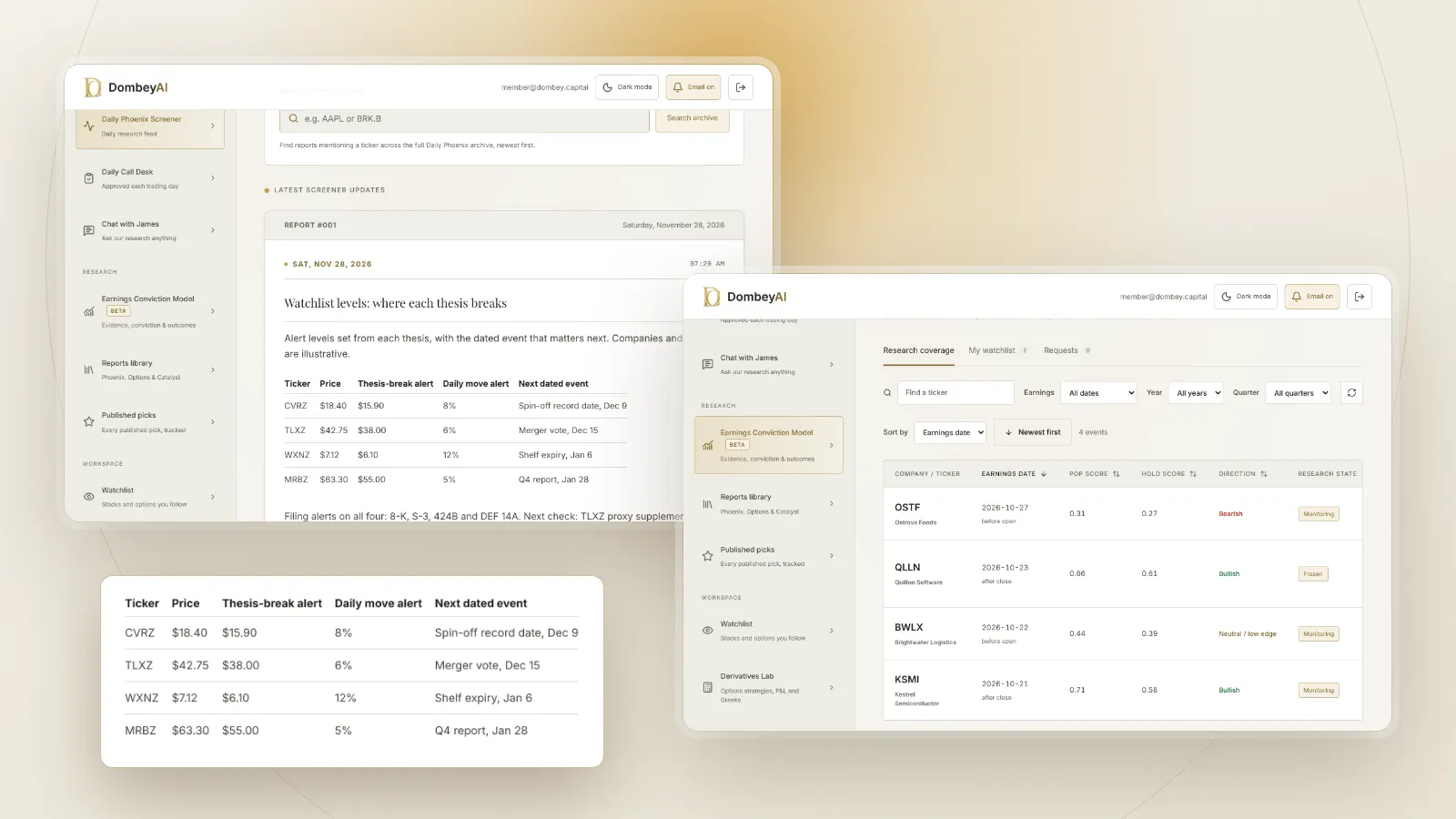


Full disclosure: Dombey Capital is our own research service and our top pick here, for the reasons below. The section on where it falls short is there so you can judge whether it fits your process.
Quick comparison
| Tool | Best for | Key features | Price (as of November 2026) |
|---|---|---|---|
| Dombey CapitalTop pick | Knowing which dated events to watch | Founding Membership: weekly Phoenix Report, weekly Options Research, Catalyst Briefing, DombeyAI Portal with the Daily Phoenix Screener and Earnings Conviction Model; Standard Access: Biweekly Catalyst Briefing | Founding Membership $1,200/year; Standard Access $80/year or $8/month; Public Archive free |
| TradingView | Chart and technical alerts | Price, technical and watchlist alerts; multi-condition alerts on paid plans | Basic free; Essential $12.95/month to Ultimate $199.95/month, billed annually |
| Stock Alarm | Alerts by phone call | Price, percent change, moving average, MACD, RSI, cross and earnings triggers; phone, push and email | See the vendor's pricing page |
| Finviz Elite | Unlimited screener and price alerts | Stock, price, screener, portfolio and calendar alerts by email and push | $39.50/month or $299.50/year |
| Stock Rover | Alerts inside a research platform | Real-time email alerting, plus text and email on some billing terms | Premium $34/month or $348/year and up |
| Yahoo Finance | A familiar app with watchlists | Watchlists and portfolios; paid plans list Premium Alerts | Bronze $7.95/month billed yearly; Silver and Gold higher |
| AskEdgar | Real-time SEC filing alerts | Filing and news alerts, filing summaries, dilution data | Free; Pro $59/month list price |
| BamSEC | Filing alerts for analysts | Document search, table tools, email alerts | See the vendor's pricing page |
How we compared these tools
We compared these services from vendor pricing pages and public product pages, read on the publish date. We did not subscribe to each plan for this article, and we make no claims about the speed or accuracy of any alert.
| Criterion | Weight | What it measures |
|---|---|---|
| Fit for dated events | 25% | Whether the tool helps you prepare for a catalyst, not just react to a move |
| Alert types | 20% | Price, percent change, technical, screener and filing triggers |
| Delivery | 15% | Push, email, text and phone call options |
| Limits | 15% | How many alerts each plan allows |
| Price and terms | 25% | List prices and free plan limits from the vendor's own pages |
The weights favor event fit and price because most investors need a few well-placed alerts more than hundreds of triggers. If you trade actively on technical levels, weight alert types and limits more heavily and TradingView moves up.
Quick picks by job
Best for knowing which dated events to watch: Dombey Capital
Dombey publishes dated research on situations where an event can change a stock's value, and the Catalyst Briefing lists forthcoming corporate and market events. It tells you what to set alerts for and when, which an alert app cannot.
Best for chart and technical alerts: TradingView
TradingView ties alerts to its charts, with price and technical alerts on every paid plan and watchlist alerts on Premium and Ultimate.
Best for alerts by phone call: Stock Alarm
Stock Alarm lists phone call delivery alongside push and email, which helps when a missed alert matters more than a quiet phone.
Best for unlimited screener alerts: Finviz Elite
Finviz Elite sends alerts when new stocks match a saved screen, along with unlimited price, portfolio and calendar alerts.
Best for alerts inside a research platform: Stock Rover
Stock Rover pairs real-time alerting with screening and portfolio research for investors who want one platform.
Best for a familiar app: Yahoo Finance
Yahoo Finance is where many investors already keep watchlists, with paid plans that add premium features.
Best for real-time SEC filing alerts: AskEdgar
AskEdgar's Pro plan lists real-time SEC filing and news alerts with plain-language summaries.
Best for filing alerts with document search: BamSEC
BamSEC combines email alerts with search across filings and transcripts and tools for pulling tables.
Full reviews
1. Dombey Capital
What it does. Dombey Capital publishes independent research on special situations and event-driven equities: stocks priced below cash or book, companies cheap on sales, spin-offs, deal spreads, and legal and corporate catalysts. It does not send price alerts. There are three access levels:
- Founding Membership ($1,200 a year, annual billing only): the weekly Phoenix Report, weekly Options Research, the Catalyst Briefing, the DombeyAI Portal with the Daily Phoenix Screener and the Earnings Conviction Model, valuation and execution analysis, and priority access.
- Standard Access ($80 a year, about $6.67 a month, or $8 a month on monthly billing), the lower-cost option: the Biweekly Catalyst Briefing on forthcoming corporate and market events, plus the complete public-research archive.
- Public Archive (free): published executive theses and public research.
Best for. Investors who want to set alerts around a dated event and know what to check when it arrives.
Pricing. Public Archive free. Founding Membership $1,200 a year. Standard Access $80 a year or $8 a month. See the subscription options.
Pros
- Research names the catalyst, the date and what would change the view.
- The Public Archive is free, so you can judge the work before paying.
- Standard Access is a low-cost way to get the event calendar.
Cons
- Not an alert app: no price, technical or filing alerts.
- Coverage is narrow by design.
- Founding Membership costs more than most alert apps.
Verdict: Our top pick for deciding what to watch; pair it with one of the alert apps below.
2. TradingView
What it does. TradingView is a charting platform with alerts built in. Its pricing page lists 3 price alerts on Basic, 20 price and 20 technical alerts on Essential, 100 of each on Plus, 400 of each on Premium with 2 watchlist alerts, and 1,000 of each on Ultimate with 15 watchlist alerts. Multi-condition alerts are listed from Essential up. The page lists different alert durations by plan.
Best for. Investors and traders who set alerts on chart levels, indicators and drawings.
Pricing. Basic free. Essential $12.95, Plus $29.95, Premium $59.95 and Ultimate $199.95 a month, billed annually.
Pros
- Alerts on price, indicators and chart drawings in one place.
- Clear alert limits by plan.
- Watchlist alerts on the top two plans.
Cons
- Only 3 price alerts on the free plan.
- The page shows annual prices only; check monthly billing on the vendor's site.
- Built for charts, not fundamentals or filings.
Verdict: The best choice for chart-based alerts.
3. Stock Alarm
What it does. Stock Alarm is an alert app for iPhone, Android and the web. Its homepage lists triggers for price limits, percent change and price change, simple and exponential moving averages, MACD, RSI, golden and death crosses, IPOs and earnings, and economic signals such as CPI. It says alerts run on real-time data for more than 65,000 assets and cryptocurrencies. Delivery is by push, email or phone call. Its membership page describes Stock Alarm Pro, with the app, web alerts and a research terminal, and says the free plan keeps a free alert allowance.
Best for. Investors who want an alert that is hard to miss, by phone call if needed.
Pricing. See the vendor's pricing page; the pages we read did not list prices.
Pros
- Phone call delivery as well as push and email.
- A wide range of technical and event triggers.
- Web and mobile alerts on one account.
Cons
- Prices were not listed on the pages we read.
- Research tools are secondary to alerts.
- No filing alerts.
Verdict: The best choice when delivery matters most.
4. Finviz Elite
What it does. Finviz Elite is the paid tier of the Finviz screener. The Elite page lists unlimited stock, price, screener, portfolio and calendar alerts, with email alerts and push notifications covering news, ratings, insider trading, SEC filings and price moves, and notifications when new stocks match a screen. The comparison table marks these alerts as not included for free users. Our Finviz alternatives list covers other screeners.
Best for. Investors who screen for ideas and want to know when a new stock matches.
Pricing. $39.50 a month billed monthly, or $299.50 a year. The page showed a first-year offer of $149 when we read it.
Pros
- Unlimited alerts across stocks, screens and portfolios.
- Screener alerts are a strong fit for idea generation.
- Insider and SEC filing alerts alongside price.
Cons
- No alerts on the free tier.
- Alerts sit behind the paid tier only.
- No phone call delivery listed.
Verdict: The best choice for screen-driven alerts.
5. Stock Rover
What it does. Stock Rover is a research and screening platform. Its plans page lists real-time email alerting on Premium, with text and email alerting on its monthly and two-year listings, and higher plans include all Premium features along with more metrics.
Best for. Investors who want alerts alongside screening, portfolio analysis and research in one tool.
Pricing. Premium $34 a month or $348 a year. Premium Plus $70 a month or $588 a year. Ultimate $99 a month or $948 a year. Ultimate Pro $199 a month or $1,788 a year. The page showed sale prices on annual and two-year plans through November 30.
Pros
- Alerts sit inside a full research platform.
- Real-time alerting listed on Premium.
- Several billing terms.
Cons
- More platform than most people need for alerts alone.
- Alert features are described briefly on the plans page.
- No alert-only plan for investors who want alerts alone.
Verdict: A good choice if you want research and alerts together.
6. Yahoo Finance
What it does. Yahoo Finance offers quotes, news, watchlists and portfolios, with paid plans. Its plans page lists Bronze, Silver and Gold, and its FAQ names Premium Alerts among subscription features without detailing them. Our Yahoo Finance alternatives list covers other options.
Best for. Investors who already keep watchlists there and want something familiar.
Pricing. Bronze $7.95 a month, billed $95.40 yearly. Silver $19.95 a month, billed $239.40 yearly. Gold $39.95 a month, billed $479.40 yearly.
Pros
- Familiar interface and broad news coverage.
- Low entry price on Bronze.
- Watchlists and portfolios in one place.
Cons
- Alert features are not detailed on the plans page.
- No technical or phone call alerts listed.
- Not built for filings.
Verdict: Fine for simple watchlists; use a dedicated tool for serious alerts.
7. AskEdgar
What it does. AskEdgar focuses on SEC filings. Its pricing page lists a free plan with plain-language filing titles, filing summary previews, a basic screener and a ticker watchlist. Pro adds real-time SEC filing and news alerts, dilution risk and offering data, and summaries of filings, earnings calls and news. Professional+ adds an advanced screener and a deals screener.
Best for. Investors who want to know the moment a company files, especially at smaller companies where offerings can move the stock.
Pricing. Free $0. Pro $59 a month list price, shown at $41.30 in a Black Friday offer. Professional+ $199 a month list, shown at $99.50. Enterprise custom.
Pros
- Real-time filing alerts with summaries.
- Dilution and offering data alongside alerts.
- A free plan with a watchlist.
Cons
- Alerts are for filings and news, not price levels.
- Monthly billing only listed.
- Built around filings rather than charts.
Verdict: The best choice for filing alerts on small companies.
8. BamSEC
What it does. BamSEC is a filing research tool. Its homepage describes document search across filings and transcripts, table tools that pull historical numbers from filings, screening tools, email alerts, and tools to compare filings. The page announces that BamSEC and AlphaSense have joined forces. Our list of the best SEC filing tools and EDGAR alerts covers more options.
Best for. Analysts who want filing alerts and the tools to read the filing quickly.
Pricing. See the vendor's pricing page; the homepage offers a free trial.
Pros
- Alerts tied to a strong filing search and table extraction.
- Transcripts searchable with filings.
- Built for professional workflows.
Cons
- Prices not listed on the homepage.
- No price alerts.
- More than a casual investor needs.
Verdict: A good choice for analysts who live in filings.
Where Dombey falls short
Dombey is not an alert app. It does not send price, technical or filing alerts, and it does not cover the whole market. Coverage is narrow by design and centers on special situations and dated events. It is a small team, the research is published under a pen name, and the public track record is short. If you want alerts on hundreds of stocks, TradingView or Finviz Elite does that; if you want filing alerts, AskEdgar or BamSEC does. Dombey tells you which events matter and when.
Free vs paid
Free options are thin. TradingView's free plan has 3 price alerts, Stock Alarm keeps a free allowance, and AskEdgar's free plan includes a watchlist without real-time alerts. Free Finviz accounts have no alerts. For most investors, one paid alert tool plus free EDGAR searches is enough. Our guide on how to search SEC EDGAR filings covers the free route. Dombey's Public Archive is free; Founding Membership adds the weekly Phoenix Report, Options Research and the DombeyAI Portal, and Standard Access adds the Biweekly Catalyst Briefing.
How to choose
| Your situation | Pick | Add later when |
|---|---|---|
| You invest around spin-offs, deals and other dated events | Dombey CapitalTop pick | You want alerts on the stocks it covers |
| You set alerts on chart levels and indicators | TradingView | You want filing alerts too |
| You must not miss an alert | Stock Alarm | You want more research tools |
| You screen for new ideas | Finviz Elite | You need phone call delivery |
| You trade small caps around offerings | AskEdgar | You want price alerts |
| You want research and alerts in one platform | Stock Rover | You need filing alerts |
Set alerts with a plan. Our guide on how to build a stock watchlist covers which levels to set, and our guide on how to build a catalyst calendar covers dated events. When a filing alert arrives, our guide on how to read an 8-K for catalysts shows what to check first. For a wider ranking of paid services, see our list of the best stock picking services.
The bottom line
For deciding which dated events to watch, our top pick is Dombey Capital, with Founding Membership for the full research and the DombeyAI Portal and Standard Access as the lower-cost option. For alerts themselves, TradingView is best for charts, Stock Alarm for phone call delivery, Finviz Elite for unlimited screener alerts and AskEdgar for real-time filing alerts. Pair one price alert tool with filing alerts, so you know both that a stock moved and why.