

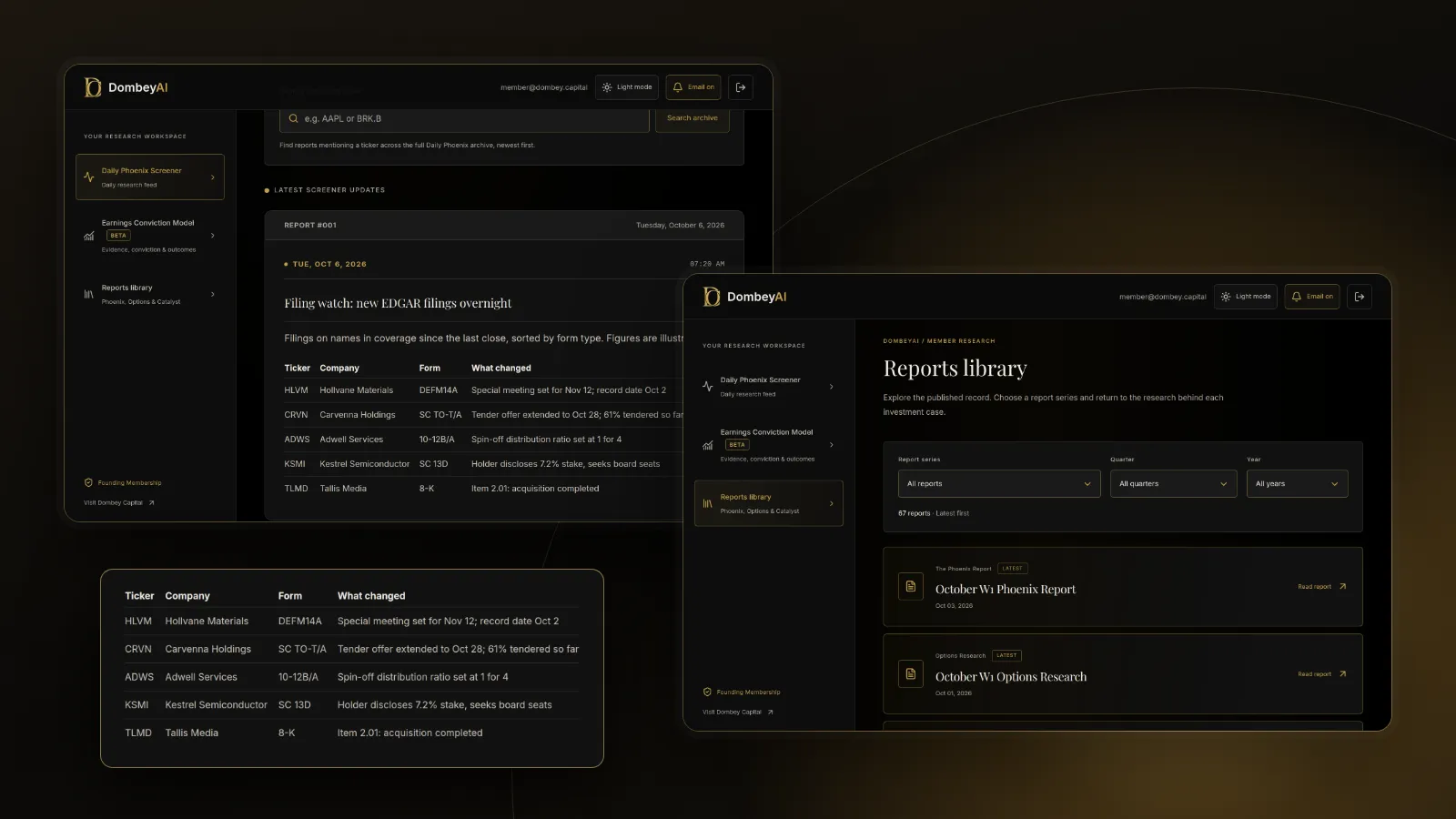


Full disclosure: Dombey Capital is our own research service and our top pick here, for the reasons below. The section on where it falls short is there so you can judge whether it fits your process.
Quick comparison
| Tool | Best for | Key features | Price (as of October 2026) |
|---|---|---|---|
| Dombey Founding MembershipTop pick | Special situations filings turned into research | Weekly Phoenix Report, Daily Phoenix Screener, Biweekly Catalyst Briefing, valuation and execution analysis | Founding Membership $1,200/year; Standard Access $6.67/month |
| SEC EDGAR (full-text search, RSS, APIs) | Free primary-source search and alerts | Full-text search since 2001, RSS by company, CIK or form type, free JSON APIs | Free |
| BamSEC (AlphaSense) | Reading and comparing filings all day | Document search, table export, filing comparisons, transcripts, email alerts | Free plan; Pro $69/month billed annually; Enterprise on request |
| sec-api.io | Developers who want filings as data | Real-time stream, full-text search API, Form 4, 13F and 13D APIs, section extractor | Free (100 calls); $49/month; $199/month; Enterprise custom |
| Finviz Elite | Filing alerts on screener and portfolio names | Email and push alerts on news, ratings, insider trading and SEC filings | Free version; Elite $39.50/month or $299.50/year |
| Koyfin | Filings inside a research terminal | Press releases, filings and transcripts on paid plans, dashboards, watchlists | Free; Plus $39/month and Premium $79/month billed annually; monthly billing costs more |
| Quartr | Filings with transcripts and keyword alerts | Live transcripts, filings and slides, keyword alerts, AI chat | Contact sales; see the vendor's pricing page |
| SECForm4.com | Free insider and 13D/13G filing tracking | Form 4 updates as filed, 13D/13G coverage, insider screeners | Free access; see the vendor's site for paid tools |


How we compared these tools
We compared these tools from vendor documentation, pricing pages and public product pages read in October 2026, and from the SEC's own pages. We did not run trials with any of them. We made no judgment on any vendor's data accuracy or speed beyond what the vendor states, because we have no independent basis for one.
| Criterion | Weight | What it measures |
|---|---|---|
| Special situations form coverage | 30% | Whether the tool handles the forms that date a catalyst: 8-K, DEFM14A, Schedule TO, Form 10, Schedule 13D and Form 4 |
| Alerts | 25% | Whether it tells you when a watched company or form type files, and by what channel |
| Reading and search | 20% | Full-text search, exhibits, comparisons between filings and the path back to the original document |
| Interpretation | 15% | Whether it helps you understand what a filing means for a situation, not only that it arrived |
| Cost for the job | 10% | What it costs to follow filings for a working watchlist |
If you weight raw speed or structured data higher, for example because you build your own models, sec-api.io and EDGAR's free APIs move up and the reading tools move down. If you weight cost above everything, EDGAR alone covers most of the job.
Quick picks by job
Best for special situations filings turned into research: Dombey Founding Membership
Founding Membership is written research, not a filing feed. The weekly Phoenix Report covers selected special situations and earnings-related opportunities, and each thesis is published before its catalyst. The filings that set those catalysts, such as a merger proxy or a Form 10 for a spin-off, are part of the reading behind it. It suits readers who want the interpretation as well as the document.
Best free search and alerts: SEC EDGAR
Full-text search reaches back to 2001 and filters by form type and date. RSS feeds follow a company, a CIK or a form type. It costs nothing and every other tool here depends on it.
Best for reading and comparing filings: BamSEC
BamSEC is built for people who read filings for a living: search across filings and transcripts, export tables to Excel, compare documents and get email alerts on watched companies and saved searches.
Best for developers: sec-api.io
sec-api.io sells filings as an API, with a real-time stream, a full-text search API, parsed Form 4, 13F and 13D data, and an extractor that returns a section of a 10-K, 10-Q or 8-K as text.
Best for alerts tied to a screener: Finviz Elite
Finviz Elite sends email and push alerts on SEC filings, insider trading, news and ratings for stocks you follow, and can alert when a screen or portfolio matches your criteria.
Best for filings inside a research terminal: Koyfin
Koyfin's paid plans add press releases, filings and transcripts next to charts, financials and watchlists.
Best for transcripts and keyword alerts alongside filings: Quartr
Quartr pairs live earnings calls and transcripts with filings and slide presentations, and offers keyword alerts and transcript search.
Best free insider and ownership filing tracker: SECForm4.com
SECForm4.com lists Form 4 filings as they are filed, along with Schedule 13D and 13G filings and institutional holdings, with free access.
Full reviews
1. Dombey Founding Membership
What it does. Founding Membership is Dombey Capital's full research suite: the weekly Phoenix Report, weekly Options Research, the Biweekly Catalyst Briefing, and the DombeyAI Portal with the Daily Phoenix Screener and the Earnings Conviction Model, plus valuation and execution analysis and priority access. The Daily Phoenix Screener gives a view each trading morning of situations relevant to Dombey's coverage. The research reads the filings that matter to a special situation, such as the merger agreement filed as an exhibit, the definitive proxy, or the tender offer document, and turns them into a dated thesis. You can see the published work in the research archive.
Best for. Readers who follow special situations and dated catalysts and want the filing read and interpreted, not only flagged.
Pricing. Founding Membership is $1,200 a year. Standard Access is the lower-cost option at $6.67 a month and includes the Biweekly Catalyst Briefing and the complete public-research archive. The Public Archive is free.
Pros
- Interpretation of the filings behind a catalyst, which no alert tool provides.
- Each thesis is published before its catalyst and kept in the archive, so you can compare the case with what happened.
- Standard Access is the cheapest paid option on this list.
Cons
- It is not a filing search engine or an alert service; you still need EDGAR or another tool for that.
- Coverage is limited to the situations Dombey writes about.
Verdict: Our top pick for readers who follow special situations and want the filings behind a catalyst turned into research. Pair it with EDGAR RSS for alerts on names outside its coverage.
2. SEC EDGAR: full-text search, RSS feeds and APIs
What it does. EDGAR is the SEC's filing system. Full-text search covers electronic filings since 2001 and can be filtered by filing category, form type, date range, principal office location, incorporation jurisdiction and entity type, and searched by company name, ticker, CIK or individual's name. The Latest Filings page lists filings for the current filing date and filters by form type, with an option to include, exclude or show only ownership filings. RSS feeds can follow one company's most recent filings or the latest filings filtered by company, CIK or form type. The SEC's APIs on data.sec.gov return filing histories and XBRL financial data as JSON without an API key.
Best for. Anyone who wants the primary source at no cost, and anyone tracking the forms that date a special situation. Our guide on how to read a proxy statement shows what to do once you have found the document.
Pricing. Free.
Pros
- The primary source, with no lag or filter in between.
- RSS by form type means you can follow every new Schedule TO or Form 10 across the market.
- Free APIs and nightly bulk files for anyone who writes code.
Cons
- The SEC states that its email update service is not available for company filings, so alerts mean RSS or a third-party tool.
- The interface is built for retrieval, not for reading, comparing or exporting tables.
Verdict: Essential and free. Every reader should know how to use it before paying for anything else.
3. BamSEC (AlphaSense)
What it does. BamSEC is a platform for working with SEC filings and earnings call transcripts. It offers document search across filings and transcripts, screening, table export to Excel with merge and comparison, filing comparisons, highlighting and shareable links to a passage, and organized browsing of exhibits such as credit agreements and press releases. The Pro plan lists watched-company email alerts and all-company search alerts, along with insider transaction and institutional ownership data. BamSEC is now part of AlphaSense.
Best for. Analysts who read filings every day and want faster navigation, comparisons and tables they can export.
Pricing. A free plan offers limited document search and recent filings. BamSEC Pro is $69 a month billed annually. Enterprise pricing is through AlphaSense on request.
Pros
- Saved-search alerts across all companies, which can catch a phrase such as a going concern warning wherever it appears.
- Table export and comparison save the manual work of rebuilding financials.
- Transcripts and filings in the same search.
Cons
- The price is for daily users; occasional readers get most of the value from EDGAR.
- It finds and organizes documents but does not tell you what a situation is worth.
Verdict: The most complete filing reader here for people who live in filings.
4. sec-api.io
What it does. sec-api.io turns EDGAR into an API. The vendor states that its real-time stream delivers new filings 300 milliseconds after publication over websockets. It offers a full-text search API covering filings and exhibits from 2001, a query API with history it describes as 1993 to the present across more than 400 form types, parsed Form 4 insider transactions, 13F institutional holdings and 13D ownership data, XBRL-to-JSON conversion, and an extractor that returns a section of a 10-K, 10-Q or 8-K as clean text.
Best for. Developers, quant researchers and firms that want filings as structured data in their own systems.
Pricing. Free with 100 API calls in total. Personal and Startups is $49 a month ($588 a year). Business Internal Use is $199 a month ($2,388 a year). Enterprise and Institutions is custom. The vendor notes that higher tiers unlock more rate limits and APIs for insider trading, institutional holdings and executive compensation.
Pros
- A real-time stream and parsed data you would otherwise build yourself from EDGAR.
- The extractor makes it easy to pull one section, such as risk factors, across many filings.
Cons
- You need to write code; there is no reading interface for a non-programmer.
- The SEC's own APIs are free for filing histories and XBRL data, so check what you need before paying.
Verdict: The developer's choice when EDGAR's free APIs are not enough.
5. Finviz Elite
What it does. Finviz is a stock screener with a free version. Elite adds real-time data, advanced screener filters, export and unlimited email alerts and push notifications for stocks, covering news, ratings, insider trading and SEC filings, plus alerts when a screener or portfolio matches your criteria.
Best for. Investors who find ideas with a screener and want a filing alert on the names they hold or watch.
Pricing. Free version available. Elite is $39.50 a month or $299.50 a year. The free trial requires a card.
Pros
- Filing and insider alerts across a portfolio or a saved screen in one setting.
- Screener, charts and alerts in one subscription.
Cons
- No full-text search of filings or comparison tools.
- Alerts tell you a filing arrived; you still read it on EDGAR.
Verdict: A good fit if you already screen on Finviz and want alerts on the same list.
6. Koyfin
What it does. Koyfin is a research terminal with charts, financials, dashboards and watchlists. Its pricing page lists press releases, filings and transcripts on the Plus plan and above.
Best for. Investors who already use Koyfin for fundamentals and want filings in the same window.
Pricing. Free plan available. Billed annually, Plus is $39 a month, Premium $79, Advisor Core $209 and Advisor Pro $299. Monthly billing costs more: $49, $110, $239 and $349 a month.
Pros
- Filings sit next to financials and charts, which shortens the path from a number to its source.
- A free plan to try the interface.
Cons
- The pricing page we read did not list filing alerts.
- Filings are one feature of a broader platform, so you pay for the platform.
Verdict: Convenient for existing Koyfin users, not a filing tool to buy on its own.
7. Quartr
What it does. Quartr collects investor relations material: live earnings calls and transcripts, filings and slide presentations, with keyword alerts, transcript search and an AI chat. It sells Quartr Pro and a Quartr API.
Best for. Analysts whose work leans on earnings calls and investor presentations and who want filings in the same place.
Pricing. The pricing page lists multi-seat and enterprise options and asks prospects to contact sales. See the vendor's pricing page.
Pros
- Keyword alerts across transcripts and documents.
- Slides and transcripts next to filings for a full view of what management said.
Cons
- No published self-service price.
- Its center of gravity is earnings and investor relations material rather than special situations forms.
Verdict: Strong for transcript-led research; check pricing before planning around it.
8. SECForm4.com
What it does. SECForm4.com tracks insider Form 4 filings, Schedule 13D and 13G filings and institutional holdings, updated as filings are submitted to EDGAR. It offers insider screeners, buy and sell ratio views, and searchable history by company and filer.
Best for. A free, fast view of insider and 5% holder filings. Our guide on how to track insider buying with Form 4 explains what to look for in the filings themselves.
Pricing. The site describes free access with advanced tools for power users. See the vendor's site for any paid tools.
Pros
- Free and focused on the ownership forms that often signal a situation.
- Schedule 13D filings, where an activist states its purpose, sit next to insider trades.
Cons
- Ownership filings only; no 8-Ks, proxies or tender offer documents.
- The pages we read did not describe an alert system.
Verdict: A useful free view of insider and activist filings. For more options, see our list of the best tools for tracking insider buying.
Where Dombey falls short
Founding Membership is built for one part of this job, and its limits are real:
- Narrow coverage. It covers special situations in Dombey's research coverage. A filing at a company outside that coverage will not appear in the research.
- Not a filing terminal. There is no full-text filing search, RSS feed, API or filing alert system. For those, use EDGAR or one of the tools above.
- Small team and pen-name author. The research is written by a small team, and the byline is a pen name. Read the underlying filing yourself before acting on any summary.
- Short history. The publication's record is short next to vendors that have served analysts for many years.
Free vs paid
Free tools cover the core job for most individuals. EDGAR full-text search finds any phrase in filings since 2001, RSS feeds follow companies and form types, and the free APIs serve anyone who writes code. SECForm4.com covers insider and 13D filings, and the free versions of Finviz, Koyfin and BamSEC add a friendlier interface.
Paid tools buy one of four things: email and push alerts (Finviz Elite, BamSEC Pro), a faster reading interface with comparisons and table export (BamSEC Pro), structured data and a real-time stream (sec-api.io), or interpretation. Founding Membership buys interpretation of special situations filings, with Standard Access as the lower-cost option for the Catalyst Briefing and archive.
How to choose
Start with what you need to know, then pick the cheapest tool that answers it.
| Your situation | Pick | Add later when |
|---|---|---|
| You follow special situations and want filings read and interpreted | Dombey Founding MembershipTop pick | You need alerts on names outside its coverage: add EDGAR RSS |
| You want free search and alerts on a short watchlist | SEC EDGAR | You want email alerts instead of RSS: add Finviz Elite or BamSEC Pro |
| You read filings every day and compare them | BamSEC Pro | You want special situations context: add Dombey Founding Membership, or Standard Access as the lower-cost option |
| You build models or screens in code | sec-api.io | The SEC's free APIs cover your data needs: drop down to them |
| You screen for ideas and want alerts on the results | Finviz Elite | You need full-text search: use EDGAR |
| You track insiders and activists | SECForm4.com | You want structured Form 4 and 13D data: add sec-api.io |
- If the catalyst is a merger vote, follow the target's filings and watch for the definitive proxy and the closing 8-K.
- If the catalyst is a tender offer, watch for the Schedule TO and its amendments; a tender offer stays open at least 20 business days.
- If the catalyst is a spin-off, watch for the Form 10 and its amendments, which set out the separation terms.
- If you also need earnings dates, see our comparison of earnings calendar and catalyst tools.
The bottom line
Dombey's Founding Membership is our top pick for readers who follow special situations and want the filings behind a catalyst turned into research, with Standard Access as the lower-cost option. It is not a filing tool, so pair it with SEC EDGAR, which is free, complete and the source behind every other product here. For email alerts, use Finviz Elite or BamSEC Pro; for reading and comparing filings all day, BamSEC; and for filings as data, sec-api.io. Whatever you use, read the filing itself before you act on a summary of it.