



Full disclosure: Dombey Capital is our own research service and our top pick here, for the reasons below. The section on where it falls short is there so you can judge whether it fits your process.
What backtesting a stock screen involves
A stock screen is a set of rules: companies with an earnings yield above a level, say, or the cheapest decile on a valuation ratio with improving margins. Backtesting a screen means applying those rules on past dates, forming the portfolio they would have chosen, holding it under set rules, and measuring the result.
Three things decide whether the answer means anything:
- Point-in-time data. Each figure must be what investors could have known on that date, before restatements and later revisions.
- A survivorship-free universe. The test must include companies that were later delisted, acquired or went bankrupt.
- Realistic costs. Commissions, spreads and price impact, which matter most for small and illiquid stocks.
Tools differ most on these three points, and on whether they test fundamental screens, technical rules or whole portfolios.
| What you want to test | Best fit here | What you give up |
|---|---|---|
| A screen judged by a dated forward record | Dombey CapitalTop pick | A backtesting engine |
| Fundamental screens and ranking systems | Portfolio123 | A published price on the pages we read |
| Any rule you can code | QuantConnect | A point-and-click interface |
| The portfolio a screen produces | Portfolio Visualizer | Screening itself |
| Technical rules across many symbols | TrendSpider | Fundamental screens |
| Technical rules on a chart | TradingView | Universe-wide screen tests |
| No-code rule-based strategies | Composer | Deep fundamental data |
| Ready-made screens with history | AAII | Building your own test |
Quick comparison
| Tool | Best for | Key features | Price (as of November 2026) |
|---|---|---|---|
| Dombey CapitalTop pick | A screen with a dated forward record for special situations | Founding Membership: Daily Phoenix Screener, Earnings Conviction Model, weekly Phoenix Report, weekly Options Research, Catalyst Briefing; Standard Access: Biweekly Catalyst Briefing and public-research archive | Founding Membership $1,200/year (annual only); Standard Access $80/year or $8/month; Public Archive free |
| Portfolio123 | Backtesting fundamental screens | Screener with multi-factor ranking and backtesting, portfolio simulations, 20 years of data for US, Canada and Europe | 30 days free screener and backtesting access; see the vendor's pricing page |
| QuantConnect | Coding your own screen tests | Open-source LEAN engine, Python research notebooks, US equities data since 1998, fundamentals on every tier | Free plan with unlimited backtesting; paid tiers on the vendor's pricing page |
| Portfolio Visualizer | Testing the portfolio a screen produces | Portfolio backtests, factor regression, tactical allocation models | Free; Basic $30/month and Pro $55/month, billed annually |
| TrendSpider | Technical rules across many symbols | Multi-symbol and variance testing, slippage and cost settings, forward testing | See the vendor's pricing page; paid trial offered |
| TradingView | Technical rules on a chart | Strategy backtesting, deep backtesting, Pine Script, screeners | Free Basic plan; paid plans on the vendor's pricing page |
| Composer | No-code strategy backtests | Unlimited backtests in a no-code editor on the free plan | Starter $0; Advanced $10/month; Pro $32/month billed yearly |
| AAII | Ready-made screens with history | Screen power rankings, Stock Guru, Stock Factor and Premium screens | See the vendor's membership page |
How we compared these tools
We compared these tools from vendor documentation, pricing pages and public product pages, read on the publish date. We did not subscribe to each service for this article, and we make no claims about the accuracy of any tool's data or the results of any backtest beyond what each vendor states.
| Criterion | Weight | What it measures |
|---|---|---|
| Fit for fundamental and special situations screens | 25% | Whether the tool tests screens built on financial data and events, not only price |
| Data quality controls | 25% | Point-in-time data, delisted companies and history length, as the vendor describes them |
| Cost modeling and realism | 15% | Slippage, commissions and rebalancing rules |
| Cost | 20% | Price for an individual investor, from the vendor's own pages |
| Ease of use | 15% | Point-and-click versus code, and setup time |
The weights favor fundamental fit and data quality, because a screen test on flawed data produces confident, wrong answers. If you trade technical patterns, weight ease of use and multi-symbol testing more heavily, and TrendSpider and TradingView move up.
Quick picks by job
Best for a screen with a dated forward record: Dombey Capital
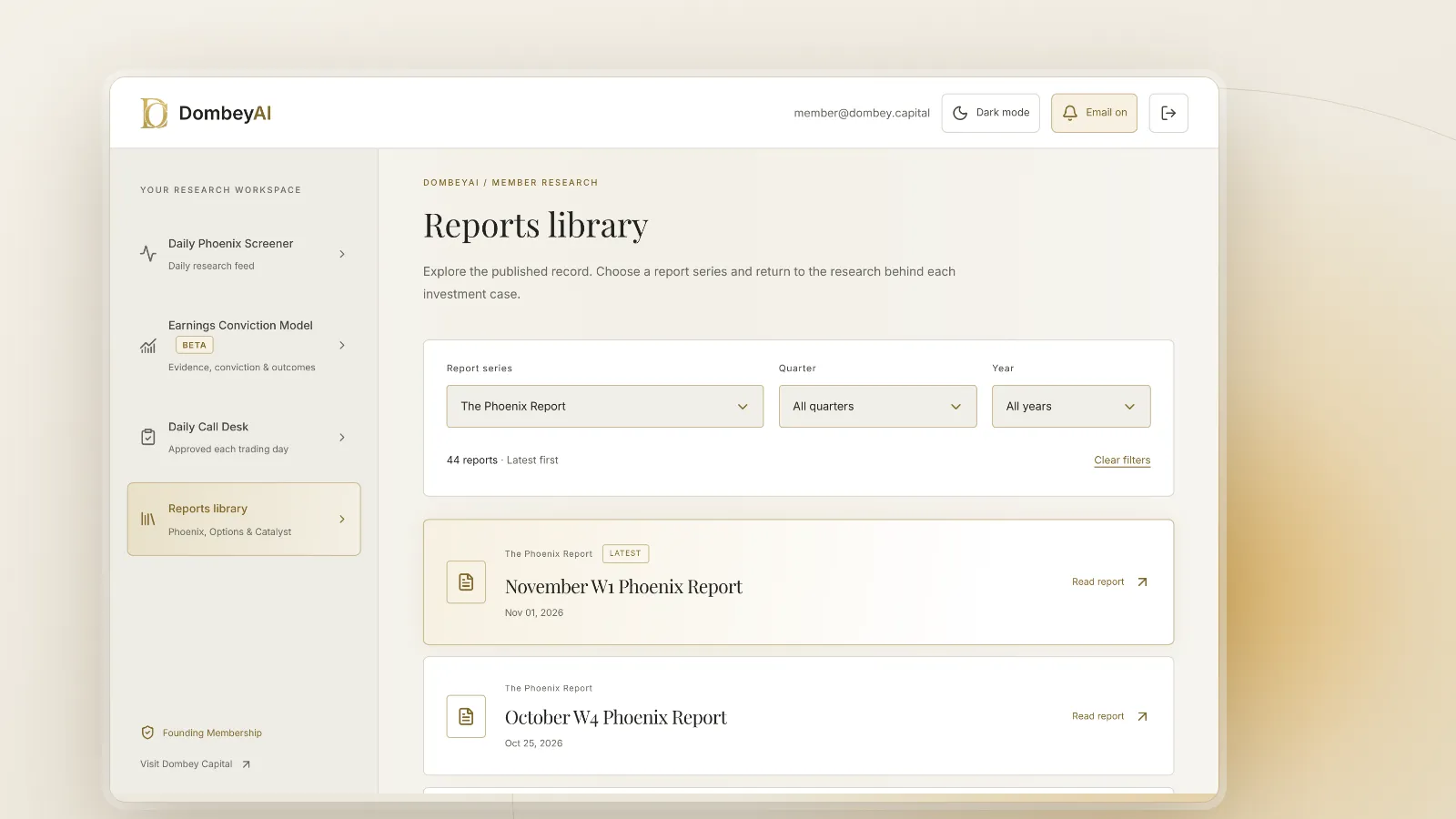
Dombey's Daily Phoenix Screener, in the DombeyAI Portal, gives Founding Members daily visibility into situations in its coverage, and every published thesis is dated and priced on the day. That forward record cannot be overfitted the way a backtest can. Standard Access is the lower-cost option.
Best for backtesting fundamental screens: Portfolio123
Portfolio123 describes its screener as multi-factor ranking and backtesting, with portfolio simulations and 20 years of backtesting data covering the US, Canada and Europe.
Best for coding your own tests: QuantConnect
QuantConnect's free plan includes unlimited backtesting and corporate fundamentals, built on the open-source LEAN engine.
Best for testing the resulting portfolio: Portfolio Visualizer
Portfolio Visualizer backtests a list of holdings and runs factor regressions, from a free tier to $55 a month billed annually.
Best for technical rules across many symbols: TrendSpider
TrendSpider lists multi-symbol backtesting, variance testing, slippage and cost settings and forward testing on all its plans.
Best for technical rules on a chart: TradingView
TradingView's strategy tester runs Pine Script strategies on historical data and reports metrics and trades on the chart.
Best for no-code rule-based strategies: Composer
Composer's free Starter plan lets you build and backtest unlimited strategies in a no-code editor.
Best for ready-made screens: AAII
AAII publishes a library of predefined screens, including screen power rankings and screens modeled on well-known investors' methods.
Full reviews
1. Dombey Capital
What it does. Dombey Capital publishes independent research on special situations and event-driven equities: stocks priced below cash or book, cheap on sales, or facing legal and corporate catalysts. Rather than a backtesting engine, it offers a forward record. Every thesis is published before its catalyst, priced on the day and kept in the archive, and Founding Members can review the full research record and the model metrics behind it in the DombeyAI Portal. There are three access levels:
- Founding Membership ($1,200 a year, annual billing only): the weekly Phoenix Report, weekly Options Research, the Catalyst Briefing, the DombeyAI Portal with the Daily Phoenix Screener and the Earnings Conviction Model, valuation and execution analysis, and priority access.
- Standard Access ($80 a year, about $6.67 a month, or $8 a month on monthly billing), the lower-cost option: the Biweekly Catalyst Briefing on forthcoming corporate and market events, plus the complete public-research archive.
- Public Archive (free): published executive theses and public research.
Best for. Investors in special situations who want screened ideas with research behind them and a dated record to judge, rather than a tool to test their own rules. Our explainer on what a special situation is covers the ground it works on.
Pricing. Founding Membership $1,200 a year. Standard Access $80 a year or $8 a month. Public Archive free. See the subscription options.
Pros
- A forward record, dated and priced at publication, which avoids the hindsight risks of a backtest.
- Screened ideas come with research on the catalyst.
- Standard Access is a low-cost entry point.
Cons
- No backtesting engine; you cannot test your own rules.
- Covers a short list of situations, not the whole market.
- The full list of limits is in the section on where Dombey falls short.
Verdict: Our top pick for special situations investors who want a screen they can judge by its record. Pair it with Portfolio123 or QuantConnect if you also test your own rules.
2. Portfolio123
What it does. Portfolio123 is a platform for building and testing quantitative stock strategies. Its home page describes the stock screener as multi-factor ranking and backtesting, and lists portfolio simulations that combine ranking systems with entry and exit rules. It advertises 20 years of backtesting data across the US, Canada and Europe, and a user testimonial on the page describes its point-in-time data.
Best for. Investors who want to backtest fundamental screens and ranking systems without writing code.
Pricing. The home page offers 30 days of free screener and backtesting access with no credit card required. Plan prices are on the vendor's pricing page.
Pros
- Built specifically for fundamental screen and ranking backtests.
- Long history across three regions.
- Free trial without a card.
Cons
- Prices were not shown on the pages we read.
- A learning curve for ranking systems and simulation settings.
Verdict: The closest fit for anyone whose main question is how a fundamental screen would have behaved.
3. QuantConnect
What it does. QuantConnect is an algorithmic research and trading platform built on LEAN, an open-source engine with more than 180 contributing engineers that runs in the cloud or on your own machine. Its research notebooks run Python, and its data include US stocks and ETFs since 1998 and equity options since 2010. The pricing page shows corporate fundamentals on every tier, including the free plan.
Best for. Investors who can code and want full control over universes, rebalancing and costs.
Pricing. The free plan includes unlimited backtesting on one backtest node, with no live trading nodes. Paid tiers (Researcher, Team, Trading Firm and Institution) are listed on the pricing page.
Pros
- Unlimited backtesting with fundamentals on the free plan.
- Open-source engine, so the test logic is inspectable.
- Any rule you can code can be tested.
Cons
- Requires programming.
- More setup than a point-and-click screener.
Verdict: The most flexible option for investors comfortable with code.
4. Portfolio Visualizer
What it does. Portfolio Visualizer is an analytics site for portfolio backtesting, factor regression and tactical allocation models. It does not screen stocks itself; you enter the holdings a screen produced and test how that portfolio would have behaved.
Best for. Checking the result of a screen as a portfolio, including its factor exposures.
Pricing. Free, with no login, for personal and educational use, supporting portfolios of up to 15 assets with limited history. Basic is $30 a month billed annually and Pro $55 a month billed annually, both supporting up to 150 assets.
Pros
- Free tier with no login.
- Factor regression shows what a screen is really exposed to.
- Clear published prices.
Cons
- No stock screening; the screen must be built elsewhere.
- The free tier limits assets and history.
Verdict: A useful second step after a screen, especially for checking factor exposure.
5. TrendSpider
What it does. TrendSpider is a technical analysis platform. Its pricing page lists backtesting on all plans, including multi-symbol backtesting, variance testing across up to 50 to 510 symbols depending on plan, CSV export, slippage and cost adjustments, AI-assisted backtesting and forward testing. Depth is measured in candles rather than years.
Best for. Traders testing price-based rules across a list of stocks.
Pricing. See the vendor's pricing page. A seasonal promotion was running when we checked, and the pricing cards offered a paid trial.
Pros
- Multi-symbol and variance testing on every plan.
- Slippage and cost settings.
- Forward testing after the backtest.
Cons
- Built for technical rules, not fundamental screens.
- History is set in candles, which limits long daily tests on lower plans.
Verdict: The strongest choice here for technical screens across many symbols.
6. TradingView
What it does. TradingView is a charting platform with screeners for stocks, ETFs, bonds and crypto. Its strategies, written in Pine Script, simulate orders on a chart; backtesting reruns the strategy on historical data and shows a Strategy Report with metrics and a list of trades. The pricing page lists strategy backtesting and deep backtesting among plan features.
Best for. Traders who want to test a coded technical rule on the chart they already use.
Pricing. A free Basic plan. Paid plans are listed on the vendor's pricing page, with savings for annual billing.
Pros
- Free Basic plan to start.
- Backtest and forward test in one view.
Cons
- Tests run on a chart symbol, not across a screened universe.
- Not built for fundamental screen tests.
Verdict: Good for chart-based rules; use a screen backtester for fundamentals.
7. Composer
What it does. Composer is a platform for building rule-based strategies in a no-code editor and running them automatically. Its pricing page says you can build and backtest unlimited strategies on the free plan.
Best for. Investors who want to test rotation or allocation rules without code.
Pricing. Starter $0; Advanced $10 a month; Pro $32 a month billed yearly ($384 a year); Business by call. Regulatory fees apply to securities sales.
Pros
- Free, unlimited backtests in a no-code editor.
- Clear published prices.
Cons
- Oriented to strategies and automated trading rather than fundamental stock screens.
- The pricing page does not list the assets covered.
Verdict: An easy way to test simple rule-based strategies; less suited to deep fundamental screens.
8. AAII
What it does. The American Association of Individual Investors publishes a library of predefined stock screens: 55 screen power rankings, 37 Stock Guru Screens based on well-known investors' approaches, 18 Stock Factor Screens and 7 Premium Screens. The screens page publishes performance figures for its screens, such as one screen's record since its 1998 inception.
Best for. Investors who want ready-made screens with a history rather than building their own test.
Pricing. See the vendor's membership page; AAII sells several membership levels and premium products.
Pros
- Many predefined screens with published histories.
- Screens modeled on known methods, useful as a starting point.
Cons
- You cannot freely change the rules and retest them.
- Membership prices were not shown on the pages we read.
Verdict: A practical shortcut for investors who want tested screen ideas without running tests themselves.
Where Dombey falls short
- Narrow coverage. Dombey covers special situations and catalyst-driven stocks. It does not screen the whole market.
- No backtesting engine. You cannot test your own rules, change parameters or export results, as Portfolio123, QuantConnect or TrendSpider allow.
- Small team. Output is limited by how many situations a small team can research properly.
- Pen-name author. Research is published under the name James Whitfield, a pen name. Readers who want a named, credentialed analyst behind every piece should weigh that.
- Short history. The public record is young. The archive keeps every thesis with its date and price, but a short record says less than a long backtest covering many cycles.
Free vs paid
You can do a good deal for free. QuantConnect's free plan includes unlimited backtesting with fundamentals, Portfolio Visualizer's free tier tests small portfolios, Composer's Starter plan backtests rule-based strategies, TradingView has a free Basic plan, Portfolio123 offers a 30-day free trial, and Dombey's Public Archive is free.
What paid tools add:
- Long point-in-time fundamental history with ranking systems (Portfolio123).
- More assets, history and saved models (Portfolio Visualizer Basic and Pro).
- Multi-symbol and variance testing with deeper history (TrendSpider's higher plans).
- More compute and live deployment (QuantConnect paid tiers).
- Screened ideas with dated research behind them (Dombey Founding Membership, with Standard Access as the lower-cost option).
A worked example: one screen, three checks
In a screen backtester, they test it over 20 years with delisted companies included and a cost assumption for small stocks. The result looks strong in the first decade and weak in the second. In a portfolio tool, they enter the latest holdings and run a factor regression, which shows heavy exposure to small, cheap stocks and little else. Finally, they compare the list against a dated research record and find that several of the names are cheap because of pending events, such as debt maturities and asset sales, which no ratio captures.
Each check answered a different question. The backtest showed how the rules behaved on past data. The regression showed what the screen was really betting on. The research showed why the current names were cheap. None of them showed what will happen next. The screen itself is close to the Acquirer's Multiple, and the trap it can fall into is the one described in our list of value trap warning signs.
How to choose
| Your situation | Pick | Add later when |
|---|---|---|
| You invest in special situations and want a dated record | Dombey CapitalTop pick | You want to test your own rules: add Portfolio123 or QuantConnect |
| You test fundamental screens without code | Portfolio123 | You want factor exposure: add Portfolio Visualizer |
| You can code | QuantConnect | You want research on the names: add Dombey Founding Membership, or Standard Access as the lower-cost option |
| You already have a list of holdings | Portfolio Visualizer | You want to build the screen: add Portfolio123 |
| You trade technical setups across many stocks | TrendSpider | You want fundamentals: add a screen backtester |
| You chart on TradingView | TradingView | You want universe-wide tests: add TrendSpider or QuantConnect |
| You want no-code rule-based strategies | Composer | You need deeper fundamentals: add Portfolio123 |
| You want ready-made screens | AAII | You want to change and retest rules: add Portfolio123 |
- If your screens are built on financial statements, start with Portfolio123.
- If you code, start with QuantConnect's free plan.
- If your rules are technical, start with TrendSpider or TradingView.
- If you want screened special situations with a record you can check, start with Dombey Capital.
For screeners without backtests, see our lists of the best stock screeners for value investors and the best free stock screeners. For a wider comparison of research services, see our Seeking Alpha vs Motley Fool vs Morningstar vs Dombey comparison.
The bottom line
Dombey Capital is our top pick for special situations investors who want to judge a screen by a dated forward record, because every thesis is published before its catalyst and priced on the day. For testing your own fundamental screens, Portfolio123 is the closest fit, and QuantConnect offers unlimited free backtesting to anyone who codes. Portfolio Visualizer checks the resulting portfolio, TrendSpider and TradingView handle technical rules, Composer suits no-code strategies, and AAII offers ready-made screens. Whichever you use, check how it handles point-in-time data, delisted companies and costs before trusting the result.