

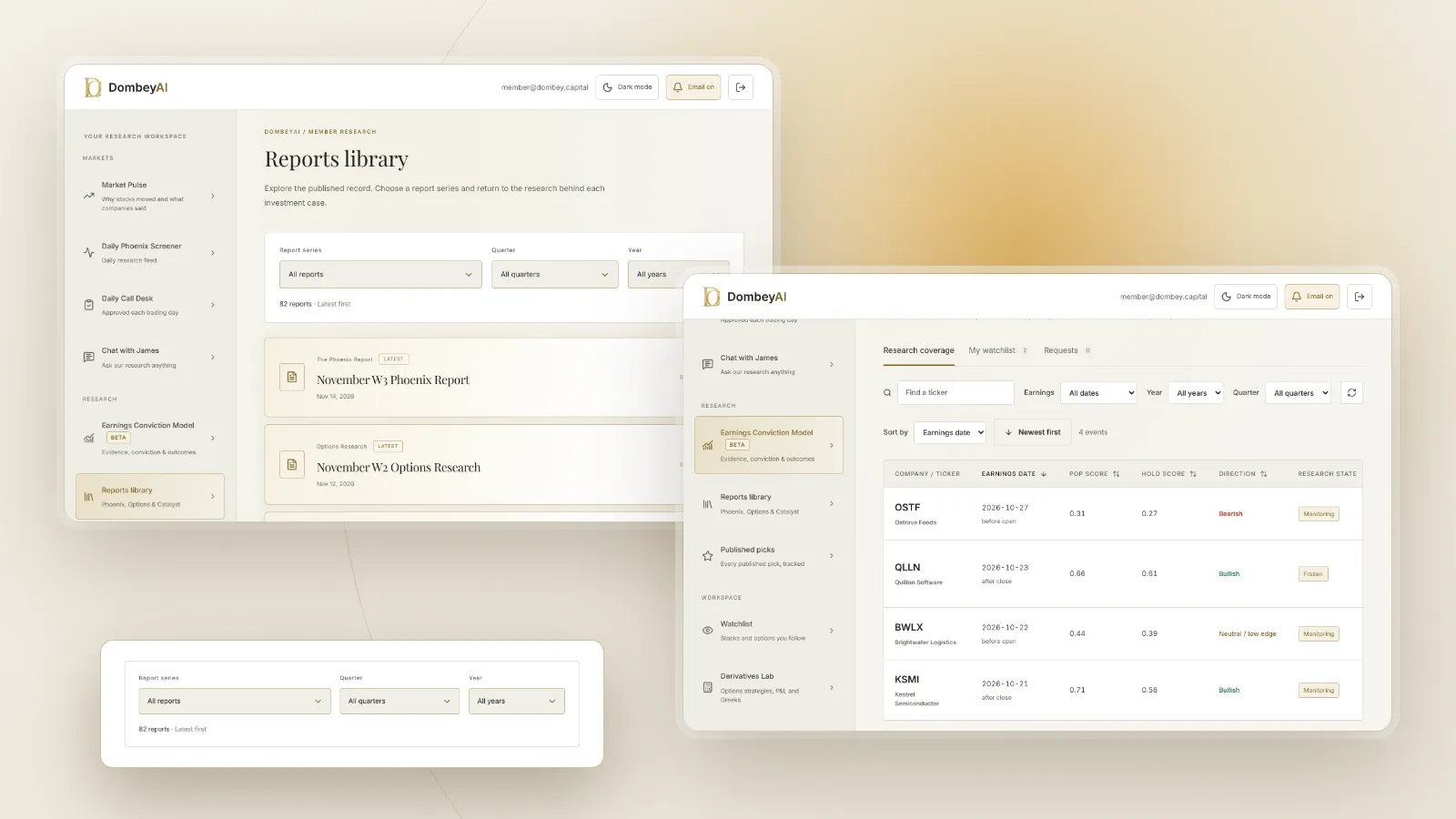

Full disclosure: Dombey Capital is our own research service and our top pick here, for the reasons below. The section on where it falls short is there so you can judge whether it fits your process.
Quick comparison
| Tool | Best for | Key features | Price (as of November 2026) |
|---|---|---|---|
| Dombey Founding Membership (research, not an app)Top pick | Finished research on special situations to file in your notes | Weekly Phoenix Report, weekly Options Research, Catalyst Briefing, DombeyAI Portal | Founding Membership $1,200/year (annual only); Standard Access $80/year or $8/month; Public Archive free |
| Obsidian | A long-lived archive you control | Linked notes stored as files on your device, optional Sync and Publish | Core app free for personal use; Sync $4/user/month billed annually; commercial license optional, $50/user/year |
| Notion | Databases for a watchlist, thesis log and catalyst calendar | Databases and views, page history, file uploads, AI on Business | Free; Plus $10/member/month; Business $20/member/month (monthly billing) |
| Readwise | Highlights from heavy reading | Reader app for PDFs, EPUBs and articles, highlight imports, export to Notion and Obsidian | From $5.59/month billed yearly; full plan $9.99/month billed yearly; 30-day trial |
| Evernote | Capturing and searching a large note archive | Notes, notebooks, web clipper, AI search tools | Free plan; see the vendor's pricing page for paid plans |
| Microsoft OneNote | Free notes inside the Microsoft ecosystem | Free notes on the web and Microsoft apps | Free |
| Logseq | Open-source, local-first outlining | Outliner notes in Markdown or Org-mode, PDF annotation, tasks | Open source (AGPL-3.0); see the vendor's site |
| Tana | AI-assisted notes and meeting capture | AI queries, meeting agent, shared spaces on Pro | Free; Pro $15/member/month billed yearly |
How we compared these tools
We compared these tools from vendor documentation, pricing pages and public product pages, read on November 16, 2026. We did not run trials. The job is keeping investment research: theses with dates, sources, filings excerpts, call notes and reviews after the catalyst.
| Criterion | Weight | What it measures |
|---|---|---|
| Durability and ownership | 25% | Whether notes stay readable and exportable for years |
| Structure | 20% | Databases, tags, links and dates for a watchlist and thesis log |
| Capture from sources | 20% | Clipping, PDF handling and highlights from filings and reading |
| Search and retrieval | 15% | Finding an old note or source quickly |
| Cost | 20% | Price of the plan you need and what free plans withhold |
If you weight team collaboration most, Notion moves up. If you weight AI features most, Notion's Business plan and Tana move up.
Quick picks by job
Best for finished research on special situations: Dombey Founding Membership
Founding Membership is written research, not a note app. It includes the weekly Phoenix Report, weekly Options Research, the Catalyst Briefing and the DombeyAI Portal with the Daily Phoenix Screener and the Earnings Conviction Model, plus valuation and execution analysis and priority access. Each thesis is published before its catalyst and kept in the archive, which makes it a dated source to file next to your own notes. Standard Access, at $80 a year, is the lower-cost option with the Biweekly Catalyst Briefing and the public research archive.
Best for a long-lived archive you control: Obsidian
Obsidian's core app is free for personal use. Notes link to each other and stay on your device, so a thesis written today will still open in years.
Best for databases and a thesis log: Notion
Notion's databases let one workspace hold a watchlist sorted by catalyst date, a log of theses and a page per company.
Best for highlights from heavy reading: Readwise
Readwise collects highlights from books, articles and PDFs and exports them to Notion and Obsidian on its full plan.
Best for capturing and searching a large archive: Evernote
Evernote's plans scale from a free plan of 50 notes to unlimited notes, with a web clipper and AI search tools.
Best free option inside Microsoft: OneNote
OneNote is free and fits investors who already work in Microsoft apps.
Best open-source outliner: Logseq
Logseq is an open-source, local-first knowledge base with PDF annotation, suited to outlining notes on filings.
Best for AI-assisted notes and calls: Tana
Tana's plans center on AI queries and a meeting agent, which suits investors who take many calls.
Full reviews
1. Dombey Founding Membership
Dombey publishes written research on special situations: stocks priced below cash, below book or cheap on sales, and legal and corporate catalysts. Best for readers who want dated research to add to their own notes. Founding Membership is $1,200 a year, annual billing only; Standard Access is $80 a year, about $6.67 a month, or $8 a month on monthly billing; the Public Archive is free.
Pros
- Each thesis is dated and published before its catalyst
- Includes the DombeyAI Portal with the Daily Phoenix Screener and Earnings Conviction Model
- Free Public Archive to judge the work first
Cons
- Not a note-taking app; you still need one for your own work
- Narrow coverage, focused on special situations
- Short public history
Verdict: The top pick for readers who want finished research on dated catalysts to file alongside their own notes.
2. Obsidian
Obsidian is a note-taking app that stores notes on your device and links them to each other. Its pricing page says the core app is free for personal use, without limits, and a commercial license is optional at $50 per user per year. Sync costs $4 per user per month billed annually or $5 billed monthly, and Publish costs $8 per site per month billed annually or $10 billed monthly.
Pros
- Free core app for personal use
- Notes stay on your device, which suits a research archive kept for years
- Links between notes suit company, theme and thesis pages
Cons
- Sync across devices is a paid add-on
- Less built-in structure than a database tool
- Collaboration is limited compared with Notion
Verdict: The best fit for an investor building a durable, personal research archive.
3. Notion
Notion is a workspace of pages and databases. Its pricing page lists Free at $0, Plus at $10 per member per month and Business at $20 per member per month on monthly billing, with up to 20% saved on yearly billing. Page history runs 7 days on Free, 30 on Plus and 90 on Business. File uploads are capped at 5 MB on Free and 5 GB on paid plans. Business adds Notion Agent, AI Meeting Notes and Enterprise Search; Free and Plus include a limited AI trial.
Pros
- Databases with views suit a watchlist, thesis log and catalyst calendar
- Free plan is enough for one investor's structure
- Strong sharing for small teams
Cons
- Free plan uploads are capped at 5 MB, small for long filings
- Full AI features require the Business plan
- Notes live in Notion's cloud rather than as local files
Verdict: The best choice for a structured research workspace, especially with a partner or team.
4. Readwise
Readwise collects what you highlight. Its pricing page lists a 30-day free trial, the full plan with Reader and Highlights at $9.99 a month billed yearly, Highlights only or Reader only at $7.99 a month billed yearly, and Highlights Lite at $5.59 a month billed yearly. Reader handles PDFs, EPUBs and articles, and the full plan imports from Kindle, Apple, Kobo and more than 40 other sources and exports to Notion and Obsidian.
Pros
- Built for reading: filings as PDFs, articles and books in one place
- Exports highlights into Notion or Obsidian
- 30-day free trial
Cons
- Not a full note-taking app on its own
- Lite plan excludes tags, notes, exports and Reader
- Another subscription on top of a notes app
Verdict: The best add-on for investors who read heavily and want highlights to flow into their notes.
5. Evernote
Evernote is a long-running note app with notebooks, a web clipper and search. Its plan comparison lists Free with 50 notes, one notebook and one synced device; Starter with 1,000 notes, 20 notebooks and three devices; and Advanced with unlimited notes and notebooks, subject to safeguard limits. It lists AI tools including an AI Assistant and Semantic Search. The page did not show prices; see the vendor's pricing page. Free trials last seven days.
Pros
- Web clipper suits saving articles and filing excerpts
- Advanced plan removes note and notebook limits
- AI search tools for a large archive
Cons
- Free plan is very limited for research use
- Prices are not shown on the plan comparison page
- Less structure than a database tool
Verdict: A fit for investors who want to capture everything and search it later.
6. Microsoft OneNote
OneNote is Microsoft's note-taking app, and its web page says you can take notes anywhere for free. It suits investors who already use Microsoft apps and want free notes without another account.
Pros
- Free
- Fits a Microsoft-based workflow
- Freeform pages suit rough call notes
Cons
- Few structured features for a watchlist or thesis log
- Notes live in Microsoft's ecosystem
- Less suited to linking notes across companies and themes
Verdict: The best free choice for investors already working in Microsoft apps.
7. Logseq
Logseq describes itself as a privacy-first, open-source platform for knowledge management, licensed under AGPL-3.0. Its project page lists support for Markdown and Org-mode files, PDF annotation and task management. A database version is in beta, and the project warns that data loss is possible in it.
Pros
- Open source and local-first
- PDF annotation suits working through filings
- Outliner format suits structured notes
Cons
- The database version is in beta with a data loss warning
- Fewer integrations than larger apps
- Pricing for any paid services is not shown on the project page
Verdict: A fit for investors who want open-source, local-first notes.
8. Tana
Tana is a note app built around AI. Its pricing page lists Free at $0 with about 50 AI queries, a meeting agent for Zoom, Teams and Google Meet and 30 days of searchable meeting history. Pro is $15 per member per month billed yearly, with 20 times the AI queries, unlimited meeting history, shared team spaces and integrations. Business is priced on request.
Pros
- Meeting agent captures calls without a bot joining
- Free plan includes AI queries
- Integrations and MCP on Pro
Cons
- Monthly pricing for Pro is not listed
- Built around AI and meetings more than long-form research
- Meeting history on Free lasts 30 days
Verdict: A fit for investors who take many calls and want AI help organizing them.
Where Dombey falls short
Dombey is not a note-taking app. It does not store your notes, clip articles or track your own theses. Coverage is narrow, centered on special situations and dated catalysts. The team is small, the author writes under a pen name and the public history is short. You will still need one of the apps above for your own work.
Free vs paid
A free setup goes a long way: Obsidian's core app or OneNote for notes, EDGAR for filings and Dombey's Public Archive for research. Pay when you need sync across devices, larger uploads, AI features or team sharing. Founding Membership at $1,200 a year adds the weekly Phoenix Report, weekly Options Research and the DombeyAI Portal, and Standard Access at $80 a year is the lower-cost option.
How to choose
| Your situation | Pick | Add later when |
|---|---|---|
| You want finished research on dated catalysts | Dombey Founding MembershipTop pick | You need your own notes: Obsidian or Notion |
| You want a durable archive you control | Obsidian | You read heavily: Readwise |
| You want databases and views | Notion | You work with a partner: Notion Plus |
| You take many calls | Tana | You want a long-term archive: Obsidian |
| You want to spend nothing | Obsidian or OneNote | You need sync or AI |
Whatever the app, the structure matters more. Keep one page per company, one per thesis and a log of decisions. A decision journal and a dated investment thesis are the two templates worth setting up first, followed by an investment checklist. After each catalyst, an investment post-mortem closes the loop. Keep primary and secondary sources labeled in every note, so you know which facts you checked yourself. For research services to file alongside your notes, our guide to the best stock picking services compares the main options.
Where this goes wrong
Notes fail when they become a collection rather than a record. Clipping every article creates an archive you never reread. Write the thesis, the date and the evidence in your own words, link to the source and review it after the event. And keep an export: an app that closes or changes its plans should not take years of research with it.
The bottom line
Our top pick is Dombey's Founding Membership for finished research on special situations and dated catalysts to file in your notes, with a free archive to judge it first. Among the apps, Obsidian is the best fit for a durable archive you control, Notion for databases and a thesis log, and Readwise for highlights from heavy reading. Evernote, OneNote, Logseq and Tana each suit a narrower job. Pick the one you will use daily, and spend the effort on dated theses and honest reviews.