

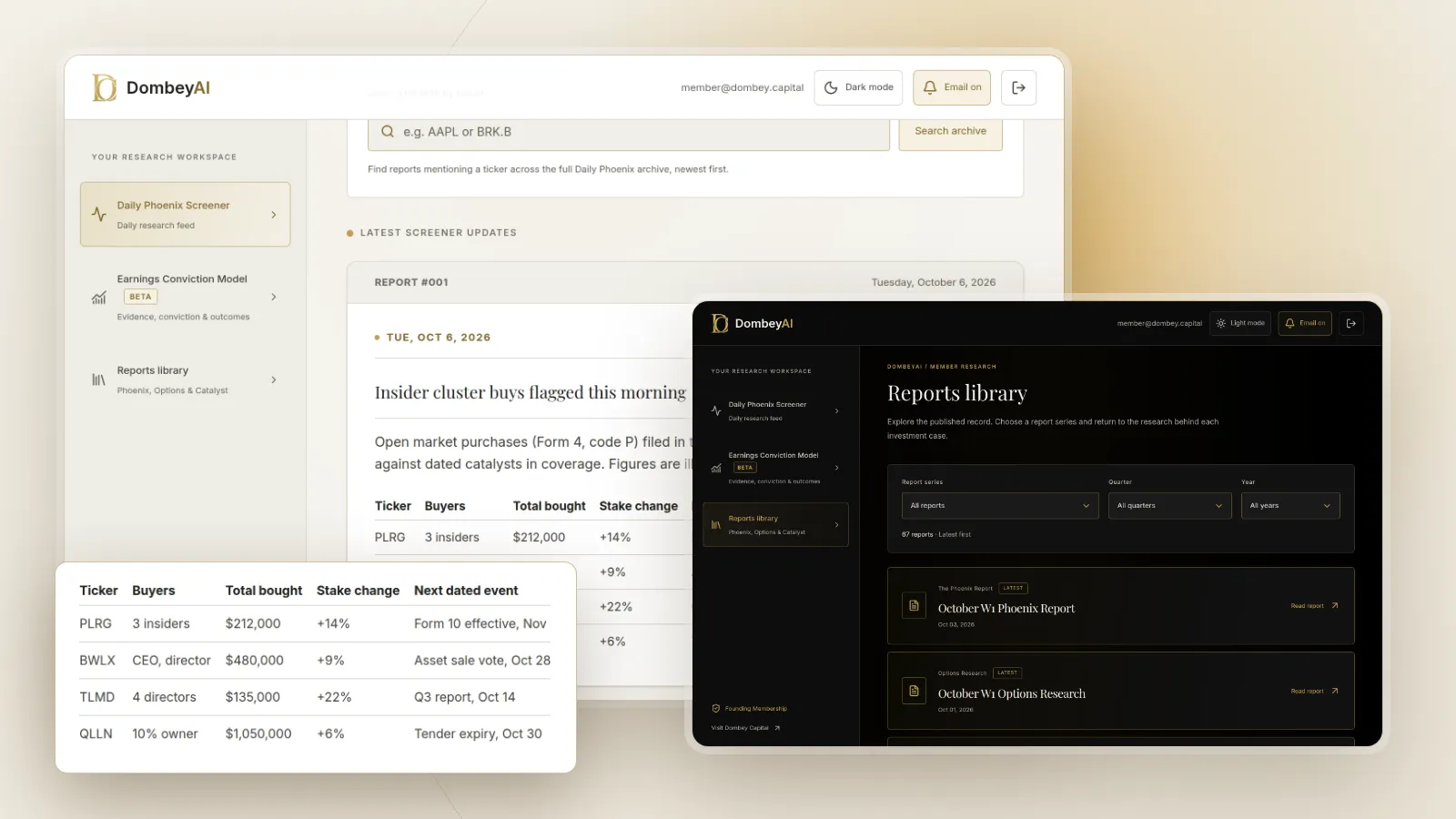


Full disclosure: Dombey Capital is our own research service and our top pick here, for the reasons below. The section on where it falls short is there so you can judge whether it fits your process.
Quick comparison
| Tool | Best for | Key features | Price (as of October 2026) |
|---|---|---|---|
| Dombey Founding MembershipTop pick | Insider buying inside special situations research | Weekly Phoenix Report, Daily Phoenix Screener, Biweekly Catalyst Briefing, Options Research, Earnings Conviction Model | Founding Membership $1,200/year; Standard Access $6.67/month |
| OpenInsider | Free Form 4 screening | Filters by transaction code, insider title, filing delay, ownership change; Latest Cluster Buys | Free |
| SEC EDGAR | Primary source and free alerts | Full-text search since 2001; RSS feeds by company, CIK or ownership forms | Free |
| Finviz | Insider alerts on a watchlist | Insider trading page with buy and sale filters; Elite alerts on insider trading and SEC filings | Free; Elite $39.50/month or $299.50/year |
| InsideArbitrage | Insider buying alongside event-driven screens | Insider buying and selling lists, premium cluster and near-high screens, Insider Alerts, merger and spin-off tools | See the vendor's pricing page |
| SECForm4.com | Insider buy and sell ratios | Insider buys, significant buys, buy and sell ratio charts, 13D and 13G filings | Free access; see the vendor's pricing page for advanced tools |
| MarketBeat | Filtered insider lists | Filters by transaction type, size, sector and market cap; CEO and CFO purchase lists | Free tracker; see the vendor's pricing page for All Access |
| Quiver Quantitative | Insider data next to alternative data | Insider dashboard limited to open market trades, executive buys, API, Premium alerts | See the vendor's pricing page |
| Unusual Whales | Insider trades next to options flow | Insider trade data in retail plans alongside options flow and screeners | Free (2-day delay); Retail Basic $50/month or $504/year; Pro $75/month or $756/year; Max $120/month or $1,224/year |
| Insider Monkey | Insider and hedge fund holdings together | Insider trading screener, purchase and sale lists, 13D and 13G filings | See the vendor's pricing page |


How we compared these tools
We compared these tools from vendor documentation, pricing pages and public product pages read in October 2026. We did not run trials with any of them. Prices are as listed by each vendor on the day; where a vendor page did not show a price, the table says so.
| Criterion | Weight | What it measures |
|---|---|---|
| Signal filtering | 30% | Separating open market purchases (code P) from grants, exercises and gifts, and filtering by role, size and cluster |
| Source trail | 20% | A link from the trade back to the Form 4 on EDGAR, with filing date and trade date |
| Alerts | 20% | Notice when a watched company or insider files |
| Context for special situations | 15% | Whether the tool helps place a purchase next to a dated catalyst or event |
| Cost for the job | 15% | What it costs to find and follow insider purchases, not the whole platform |
If you trade daily and care most about speed, weight alerts higher and the paid alert tools move up. If you only check insider activity on companies you already research, the free screeners and EDGAR cover nearly all of the job. We made no judgment on any vendor's data accuracy, speed or performance, because we have no independent basis for one.
Quick picks by job
Best for insider buying inside special situations research: Dombey Founding Membership
An insider purchase is one piece of evidence. In a spin-off, a recapitalization or a stock trading below net cash, the more useful question is what the insider may be buying ahead of, and when that event lands. Founding Membership gives you written research and dated catalysts on the situations in Dombey's coverage. It does not list Form 4 filings, so it works alongside a free screener.
Best free Form 4 screener: OpenInsider
OpenInsider's screener filters by filing date, trade date, filing delay, transaction code, insider title, industry and change in ownership, and it has ready-made lists such as Latest Cluster Buys and CEO and CFO purchases over $25,000.
Best primary source and free alerts: SEC EDGAR
Every tracker here reads EDGAR. Its latest filings RSS feed can be filtered by company, CIK or form type, and it can include, exclude or select only ownership filings on Forms 3, 4 and 5.
Best paid alerts for a watchlist: Finviz
Finviz Elite sends email and push alerts on news, ratings, insider trading, SEC filings and price moves, and Finviz's free insider page shows the latest trades with buy and sale filters.
Best for insider buying next to event-driven screens: InsideArbitrage
InsideArbitrage pairs insider buying lists with merger arbitrage, spin-off and buyback tools, which suits readers who work across several event types.
Best for insider data alongside options flow: Unusual Whales
Its retail plans include insider trade data next to an options flow feed and screeners, for traders who already watch options activity.
Full reviews
1. Dombey Founding Membership (and Standard Access)
What it does. Founding Membership is Dombey's full research service: the weekly Phoenix Report on selected special situations and earnings-related opportunities, weekly Options Research, the Biweekly Catalyst Briefing, and the DombeyAI Portal with the Daily Phoenix Screener each trading morning and the Earnings Conviction Model. It also includes valuation and execution analysis and priority access. Standard Access, the lower-cost option, includes the Biweekly Catalyst Briefing and the complete public-research archive.
Best for. Readers who see an insider purchase in a special situation and want written research on the situation itself: the catalyst, its date, and what could undermine the case.
Pricing. Founding Membership is $1,200 a year. Standard Access is $6.67 a month. The Public Archive is free.
Pros
- Places events such as spin-offs, deal closings and earnings in written research with dates, which a list of trades does not do.
- Each thesis is published before its catalyst and kept in the archive, so you can compare the case with what followed.
- Standard Access is the cheapest paid option on this list.
Cons
- It does not track Form 4 filings, screen insider trades or send insider alerts.
- Coverage is limited to the special situations Dombey researches.
Verdict: Our top pick for readers who use insider buying as one input into special situations research. Pair it with OpenInsider or EDGAR for the filings.
2. OpenInsider
What it does. OpenInsider is a free screener built on SEC Form 4 filings. Filters cover filing date, trade date, filing delay, transaction type (purchase, sale, grant, sale to issuer, gift, tax, option exercise and others), insider title from CEO to 10% owner, industry, trade value and change in ownership. Ready-made lists include Latest Cluster Buys, Latest Insider Purchases over $25,000, Latest CEO and CFO Purchases over $25,000, and top officer purchases by day, week and month.
Best for. Anyone who wants to find open market insider purchases for free and filter out the noise.
Pricing. Free. We did not see a paid plan on the site.
Pros
- The transaction code filter makes it easy to keep only code P purchases.
- The filing delay filter shows how late a trade was reported.
- Cluster buy and officer purchase lists answer the common questions in one click.
Cons
- The pages we read did not describe email alerts.
- Plain tables with little company context.
Verdict: The best free place to find insider purchases. Click through to the Form 4 before acting on a row.
3. SEC EDGAR
What it does. EDGAR holds every Form 3, 4 and 5. Full-text search covers electronic filings since 2001, with filters by filing category, date range, company name, ticker, CIK and individual's name. The SEC's latest filings RSS feed can be filtered by company, CIK or form type, and you can include, exclude or select only ownership filings on Forms 3, 4 and 5. A company search feed can be narrowed by filing type. Our guide on how to search SEC EDGAR filings walks through the search screens.
Best for. Confirming any trade a third-party tool shows, and free alerts on a short list of companies.
Pricing. Free.
Pros
- The primary source: footnotes, prices and holdings after the trade are on the form itself.
- RSS feeds give free alerts on a company's ownership filings.
Cons
- No ranking, cluster detection or screening of insider buys across the market.
- You need an RSS reader and some patience with the raw forms.
Verdict: Essential for checking the filing and free for watching a handful of names.
4. Finviz
What it does. Finviz's insider page lists the latest insider trades with owner, relationship, date, transaction, cost, shares, value and a link to the Form 4, with filters for all, buy or sale transactions, plus Top Insider Trading Recent Week and Top 10% Owner Trading Recent Week lists. Finviz Elite adds real-time data, charting and unlimited email and push alerts for stocks, covering news, ratings, insider trading, SEC filings and price moves.
Best for. Investors who already screen on Finviz and want an alert when a watched company's insiders trade.
Pricing. Free version available. Elite is $39.50 a month or $299.50 a year.
Pros
- Insider alerts and filing alerts in one paid plan.
- The insider page links each row to the Form 4.
Cons
- The free page has fewer filters than OpenInsider.
- Alerts require Elite.
Verdict: The simplest paid route to insider alerts on a watchlist.
5. InsideArbitrage
What it does. InsideArbitrage publishes insider buying and selling lists and premium screens including Insider Buys Near Highs, Insider Cluster Purchases, Flip Floppers and Top Performing Insiders, plus an Insider Alerts feature for premium members. The same site runs merger arbitrage, spin-off, buyback and tender offer tools and a special situations newsletter.
Best for. Event-driven readers who want insider buying next to merger arbitrage and spin-off tools.
Pricing. The pages we read did not show prices. See the vendor's pricing page.
Pros
- Insider data sits beside the other event-driven screens a special situations reader uses.
- Cluster and near-high screens go beyond a plain list of trades.
Cons
- The most useful insider screens and alerts are premium.
- Prices were not shown on the pages we read.
Verdict: A good fit for readers who work across several event types and want one site for the screens.
6. SECForm4.com
What it does. SECForm4.com tracks insider trading, institutional holdings and Schedule 13D and 13G filings from EDGAR. It has lists of all insider buys, significant buys and penny stock buys, insider buy and sell ratio charts, an insider trading screener and hedge fund holdings pages.
Best for. Readers who want market-wide insider buy and sell ratios as well as company-level trades.
Pricing. The site describes free access with advanced tools for power users but did not show prices on the pages we read. See the vendor's pricing page.
Pros
- Buy and sell ratio charts give a market-level view.
- 13D filings, which show new holders of more than 5%, sit next to Form 4 data.
Cons
- The home page mixes insider data with heavy coverage of well-known names.
- Pricing for advanced tools was not shown.
Verdict: Useful for a market-level view of insider activity alongside 13D filings.
7. MarketBeat
What it does. MarketBeat's insider trading tracker shows recent purchases and sales with the insider's role, transaction size, date and shares held after, with filters by transaction type, size, country, sector and market cap, and lists of CEO and CFO purchases and top insider buying stocks. Some filters and CSV export require MarketBeat All Access.
Best for. A filtered free list of insider buying by sector or size.
Pricing. The tracker is free to view. See the vendor's pricing page for All Access.
Pros
- Shares held after the trade are shown, a quick check on how much the purchase changes the stake.
- Sector and market cap filters.
Cons
- Export and several filters sit behind All Access.
- The page did not state All Access pricing.
Verdict: A clean free list, with paid extras for export.
8. Quiver Quantitative
What it does. Quiver's insider trading dashboard shows the largest recent transactions, executive buys and latest trades, and notes that its data covers only open market purchases and sales parsed from SEC filings. Alerts require a Quiver Premium subscription, and insider data is available through its API.
Best for. Readers who want insider trades beside other datasets such as congressional trading and lobbying, or through an API.
Pricing. The pricing page did not show prices in the version we read. See the vendor's pricing page.
Pros
- Open market only, so grants and exercises are already removed.
- API access for building your own screens.
Cons
- Alerts require Premium.
- Insider trading is one dataset among many, so the insider tools are less deep than OpenInsider's filters.
Verdict: Suits data-minded readers who want insider trades in an API or next to alternative data.
9. Unusual Whales
What it does. Unusual Whales is an options flow platform. Its retail plans list institutional holders and insider trade data among their features, alongside a real-time options flow feed, screeners, alerts and dashboards. The free plan shows the platform on a two trading day delay.
Best for. Traders who watch options activity and want insider trades in the same place.
Pricing. Free with delayed data. Retail Basic is $50 a month or $504 a year, Retail Pro $75 a month or $756 a year, and Retail Max $120 a month or $1,224 a year.
Pros
- Insider trades next to options flow and institutional holders.
- Custom alerts included in paid plans.
Cons
- Priced for options traders; insider data is a side feature.
- The free tier is delayed.
Verdict: Worth it only if you already want the options tools.
10. Insider Monkey
What it does. Insider Monkey has an insider trading screener, lists of insider purchases and sales, 13D and 13G filings and hedge fund holdings pages, plus articles on insider purchases.
Best for. Readers who want insider trades and hedge fund holdings on one site.
Pricing. The site advertises paid newsletters; see the vendor's pricing page.
Pros
- Insider and hedge fund holdings data together.
- Free lists of purchases and sales.
Cons
- Heavy promotion of paid stock-pick newsletters around the data.
- Fewer screening filters described than OpenInsider.
Verdict: A second free source for insider lists, with the promotional pages left aside.
Where Dombey falls short
Dombey is the top pick for one job, and it is not an insider trading tool:
- No Form 4 data. It does not list insider trades, screen for cluster buys or send insider alerts. You need OpenInsider, EDGAR or Finviz for that.
- Narrow coverage. It covers special situations in Dombey's research. An insider purchase at a company outside that coverage will not appear.
- No broad stock data terminal. There is no market-wide screener, API or data export.
- Small team and pen-name author. The research comes from a small team, and the byline is a pen name. Weigh it accordingly and check the filings yourself.
- Short history. Its published record is short compared with the long-running sites here.
Free vs paid
Free tools cover the core job. OpenInsider finds open market purchases and cluster buys. EDGAR confirms each filing and its RSS feeds give free alerts on chosen companies. Finviz, MarketBeat and SECForm4.com add more free lists.
Paid tools buy alerts, depth and context. Finviz Elite adds insider and filing alerts. InsideArbitrage's premium screens add cluster and near-high views next to event-driven tools. Quiver and Unusual Whales put insider data next to other datasets. Dombey's Founding Membership, and Standard Access as its lower-cost option, buy research on special situations, not more insider data.
How to choose
| Your situation | Pick | Add later when |
|---|---|---|
| You follow special situations and want insider buying in context | Dombey Founding Membership, or Standard Access as the lower-cost option | You want the filings: add OpenInsider and EDGAR RSS |
| You want to find insider purchases for free | OpenInsider | A row matters: confirm the Form 4 on EDGAR |
| You want alerts on a watchlist | Finviz Elite or EDGAR RSS | You want event-driven screens too: add InsideArbitrage |
| You trade options and want insider data alongside | Unusual Whales | You want special situations research: add Dombey |
| You build your own screens | Quiver Quantitative API | You need the source text: use EDGAR full-text search |
- If you see a purchase on any tracker, open the Form 4 and check the transaction code, the price, the filing date and the footnotes.
- If several insiders buy within days, treat it as a cluster and read the most recent 10-Q and 8-Ks for a pending event.
- If the filing came in well after the two business day deadline, note the delay and check whether the trade was reported late or on Form 5.
- If the trade is a grant, an option exercise or a gift, it is not an open market purchase and usually says little about the insider's view.
Where this goes wrong
Insider buying is easy to misread. A purchase can be small relative to the insider's pay or wealth. A director may buy to meet a share ownership guideline. Trades under a prearranged plan say less about current views. Trackers also differ in how they parse codes and amendments, so the same trade can look different on two sites. Insiders sell for liquidity and diversification, so selling is weaker evidence than buying. A stock catalyst still has to arrive for a purchase to matter, and none of these tools tells you whether it will.
The bottom line
Dombey's Founding Membership is our top pick for readers who use insider buying as one input into special situations research, with Standard Access as the lower-cost option; it is research, not a Form 4 database. For the filings, OpenInsider is the best free screener and SEC EDGAR is the free primary source, with RSS alerts on ownership filings. Finviz Elite is the simplest paid route to insider alerts, and InsideArbitrage suits readers who want insider screens next to merger and spin-off tools. Whatever you use, open the Form 4 before drawing a conclusion. For more on building a filing workflow, see the best SEC filing tools and EDGAR alerts.