

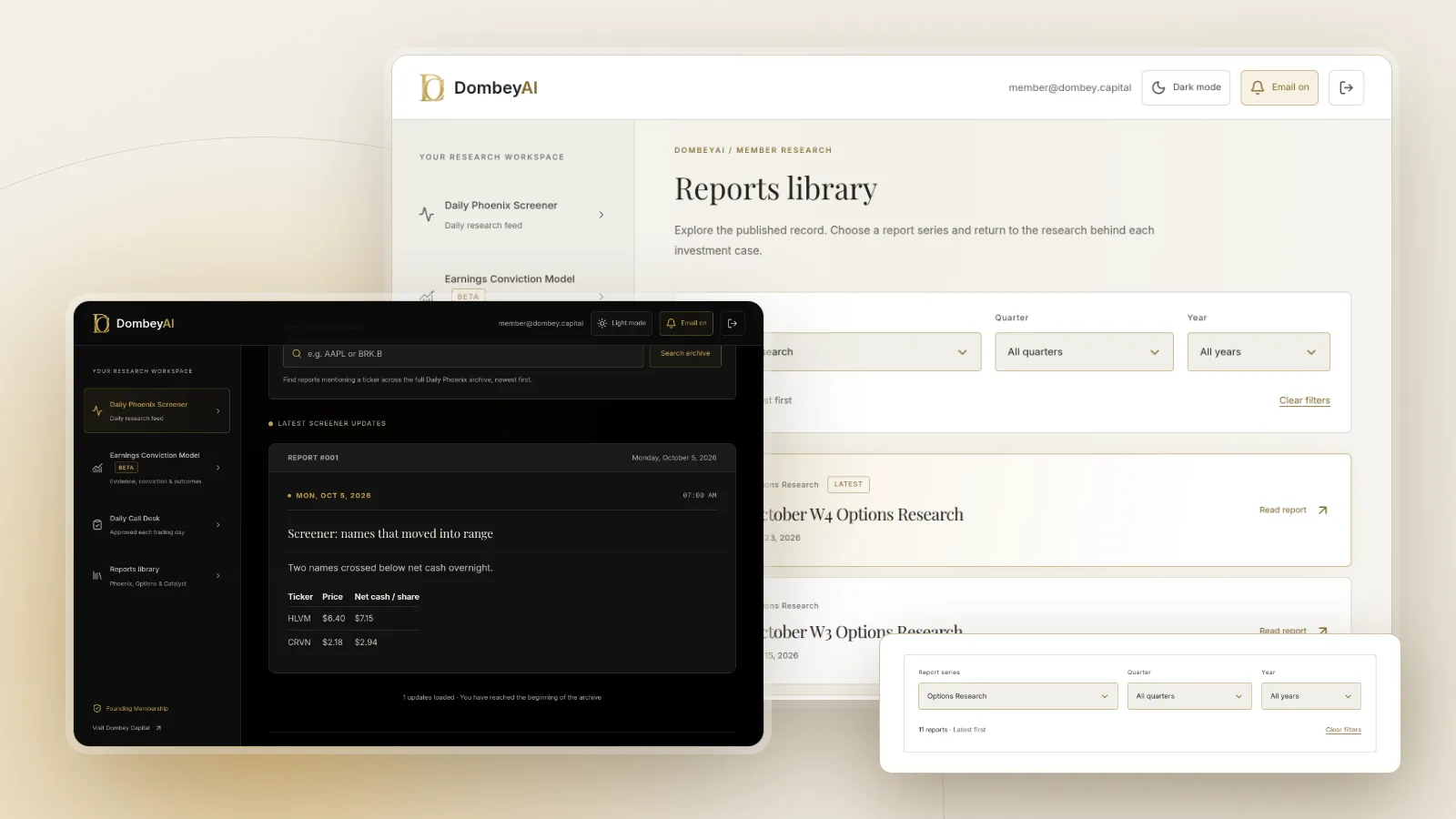


Full disclosure: Dombey Capital is our own research service and our top pick here, for the reasons below. The section on where it falls short is there so you can judge whether it fits your process.
Quick comparison
| Tool | Best for | Key features | Price (as of October 2026) |
|---|---|---|---|
| Dombey CapitalTop pick | Written research on dated special situations, read on a phone | Founding Membership: weekly Phoenix Report, weekly Options Research, Catalyst Briefing, DombeyAI Portal with the Daily Phoenix Screener and Earnings Conviction Model; no native app | Founding Membership $1,200/year (annual only); Standard Access $80/year or $8/month; Public Archive free |
| Koyfin | Fundamentals on a phone | Watchlists, charts, market movers, estimates, price targets, snapshots, news, transcripts | Free; Plus $39/month; Premium $79/month |
| Seeking Alpha | Ratings and written opinion | Contributor articles, data-driven ratings, earnings call insights | Premium $299/year; first month $4.95 |
| Simply Wall St | Visual company reports | Company reports, screeners, portfolios, dividend analysis | Free plan; Premium and Unlimited: see the vendor's pricing page |
| Morningstar Investor | Analyst fair values | Fair value and competitive advantage ratings, analyst reports, screener, portfolio tools; iPhone app on the App Store | $249/year or $34.95/month; 7-day trial |
| Stock Events | Tracking earnings, dividends and events | Events calendar, dividend tracking, portfolio tracking, AI messages | Free (up to 15 stocks); Pro $49.99/year; 7-day trial |
| Yahoo Finance | Free quotes and news, with paid research tiers | Paid plans add research reports, fair value analysis and long financial histories | Free; Bronze $7.95/month, Silver $19.95/month, Gold $39.95/month, or $95.40, $239.40 and $479.40 a year |
| TradingView | Charts and alerts on the go | Charts, screeners, alerts, fundamentals on charts | Free Basic; Essential $12.95/month to Ultimate $199.95/month billed annually |
| Investing.com | Free markets coverage, with InvestingPro | Quotes, news, calendars; InvestingPro adds fair value estimates and a financial health score | Free; InvestingPro: see the vendor's pricing page |
| Fidelity | Research inside a brokerage app | Trading with insights and tools for account holders | No account fees or minimums; commission-free online U.S. stock and ETF trades |


How we compared these apps
We compared these apps from vendor documentation, pricing pages, help pages and public product pages, read on October 26, 2026. We did not install or test the apps, and we make no claims about their accuracy, speed or investment results.
| Criterion | Weight | What it measures |
|---|---|---|
| Research depth | 25% | Financials, estimates, analysis and reports available on the phone |
| Event coverage | 20% | Earnings, dividends and corporate events, with context |
| Availability | 15% | iPhone and Android support confirmed by the vendor |
| Ease of use on a small screen | 10% | How much of the product is designed for the phone |
| Written analysis | 10% | Research and commentary beyond data |
| Cost and friction | 20% | Price of the plan you would need and the free tier |
We weighted research depth and event coverage most because a research app earns its place by telling you something about a company or an upcoming event, not by showing a quote you can see anywhere. If you weight availability and cost most, Yahoo Finance, Investing.com and the free tiers of Koyfin and Stock Events lead.
Quick picks by job
Best for written research on dated special situations: Dombey Capital
Dombey's Founding Membership includes the weekly Phoenix Report, weekly Options Research, the Catalyst Briefing and the DombeyAI Portal with the Daily Phoenix Screener and the Earnings Conviction Model. It suits readers who want to read the case for a specific situation, such as a stock priced below cash, a pending deal or a legal catalyst, with the valuation and the date written out. There is no app to install: the research is published on the web and read in a phone's browser.
Best for fundamentals: Koyfin
Koyfin describes its app as a compact version of the web product, with watchlists, charts, market movers, analyst estimates, price targets, dashboards, company snapshots, news and transcripts. The free plan includes 2 years of financials; Plus adds 10 years.
Best for ratings and opinion: Seeking Alpha
Seeking Alpha's app runs on iPhone, iPad and Android. Premium, at $299 a year, adds data-driven ratings and earnings call insights to a large library of contributor articles.
Best for visual company reports: Simply Wall St
Simply Wall St's company reports, screeners, portfolios and dividend analysis are available in its iOS and Android apps. The free plan includes 5 company reports a month.
Best for analyst fair values: Morningstar Investor
Morningstar Investor adds independent analyst reports and fair value and competitive advantage ratings. Morningstar publishes a Morningstar Investor app on Apple's App Store.
Best for tracking events: Stock Events
Stock Events tracks earnings, dividends and economic events across a portfolio or watchlist on iPhone, Android and the web, free for up to 15 stocks.
Best free all-rounders: Yahoo Finance and Investing.com
Both apps cover quotes, news and calendars free. Yahoo Finance's paid plans add research reports and fair value analysis, and InvestingPro adds fair value estimates and a financial health score.
Best for charts: TradingView
TradingView links to iOS and Android apps from its site, and its plans add more charts, indicators, alerts and up to 20 years of annual financial data on charts.
Best inside a brokerage: Fidelity
Fidelity's app runs on Apple and Android devices and pairs trading with insights and tools for account holders, with no account fees or minimums.
Full reviews
1. Dombey Capital
What it does. Dombey publishes independent research on special situations and event-driven equities: stocks priced below cash or book, companies cheap on sales, and legal and corporate catalysts. Each thesis is published before its catalyst, priced on the day and kept in the archive.
Best for. Readers who want to read the case for a specific situation on their phone, not scroll a data feed.
Pricing. Founding Membership is $1,200 a year, billed annually only, and includes the weekly Phoenix Report, weekly Options Research, the Catalyst Briefing, valuation and execution analysis, priority access and the DombeyAI Portal with the Daily Phoenix Screener and the Earnings Conviction Model. Standard Access is the lower-cost option at $80 a year (about $6.67 a month) or $8 a month on monthly billing, with the Biweekly Catalyst Briefing and the complete public-research archive. The Public Archive is free.
Pros
- Written cases built around a dated event.
- Reasoning you can check against the filings later.
- Theses are archived, so you can compare each case with what followed.
Cons
- No native iPhone or Android app, and no push alerts.
- Covers a short list of situations.
- Founding Membership costs more than most apps here.
Verdict: Our top pick for reading research on dated special situations on a phone. Pair it with a data app for quotes and alerts.
2. Koyfin
What it does. Koyfin's app is a compact version of its web platform, with watchlists, charts, market movers, analyst estimates, price targets, market dashboards, company snapshots, news and transcripts. It is available from the App Store and Google Play.
Best for. Investors who want fundamentals and estimates in their pocket.
Pricing. Free; Plus $39 a month; Premium $79 a month. The page says annual plans save up to 30%.
Pros
- Estimates, price targets and transcripts on the phone.
- Same account as the web platform.
- A free plan to start.
Cons
- Only 2 years of financials on the free plan.
- Some features are easier on a larger screen.
- Paid plans cost more than most apps here.
Verdict: The best app for fundamentals. See our list of Koyfin alternatives if it is not a fit.
3. Seeking Alpha
What it does. Seeking Alpha publishes contributor articles, news and data. Its app is available on Google Play and on the App Store for iPhone and iPad. Premium adds data-driven stock ratings and earnings call insights.
Best for. Investors who want ratings and many written opinions on a stock.
Pricing. Premium is $299 a year; the page offers the first month for $4.95.
Pros
- A large library of written analysis.
- Ratings for quick comparison.
- Low introductory price.
Cons
- Contributor quality varies.
- Ratings are models, not event research.
- Many alerts and prompts to manage.
Verdict: The pick for opinion and ratings. Our Seeking Alpha alternatives list covers rivals.
4. Simply Wall St
What it does. Simply Wall St turns company data into visual reports and adds screeners, portfolios, watchlists and dividend analysis. Its plans page links to iOS and Android apps. The free plan allows 1 portfolio of 10 holdings, 5 company reports a month and the top 4 results per screener; Premium and Unlimited raise those limits.
Best for. Investors who prefer a visual summary of a company.
Pricing. Free plan; Premium and Unlimited prices were not shown on the plans page when we read it, so see the vendor's pricing page.
Pros
- Visual reports that read well on a phone.
- Portfolio and dividend tools.
- A free plan.
Cons
- Visual scores simplify complex businesses.
- Free plan limits reports to 5 a month.
- Prices not shown on the page we read.
Verdict: The pick for visual summaries. See Simply Wall St alternatives for rivals.
5. Morningstar Investor
What it does. Morningstar Investor gives access to independent analyst reports, commentary and news, Morningstar's fair value and competitive advantage ratings, a screener with more than 200 data points, and portfolio, watchlist and alert tools. Morningstar publishes a Morningstar Investor app on Apple's App Store; we could not confirm a current Android version on Morningstar's own site.
Best for. Investors who want an analyst's estimate of value.
Pricing. $249 a year (about $20.75 a month) or $34.95 a month, with a seven-day trial for new subscribers.
Pros
- Analyst fair values and reports.
- Competitive advantage ratings.
- Portfolio tools included.
Cons
- Android availability not confirmed on its site.
- Limited charting.
- A fair value is one view, not a fact.
Verdict: The pick for analyst valuation on iPhone. See Morningstar alternatives for rivals.
6. Stock Events
What it does. Stock Events tracks a portfolio or watchlist and shows an events calendar with earnings and economic events, plus dividend tracking, on iOS, Android and the web. Pro adds unlimited watchlists, portfolio analytics, extended charts, competitor comparison, advanced dividends and more AI messages; a $0.99-a-week add-on syncs brokerage accounts.
Best for. Investors who want to know what is coming up for the stocks they own.
Pricing. Free for up to 15 stocks; Pro $49.99 a year, with a seven-day trial.
Pros
- Built around upcoming events.
- Low annual price.
- Free tier for small watchlists.
Cons
- Tracking, not deep research.
- Free plan limited to 15 stocks.
- Brokerage sync costs extra.
Verdict: The pick for tracking events. Our list of the best earnings calendar and catalyst tools covers the job in depth.
7. Yahoo Finance
What it does. Yahoo Finance's app covers quotes, news and calendars. Its paid plans work on desktop, mobile web and its iOS and Android apps: Bronze adds portfolio analytics and a daily newsletter, Silver adds research reports, Morningstar ratings and fair value analysis, and Gold adds its AlphaSpace platform, data downloads and about 40 years of financial statements.
Best for. Investors who want a familiar free app with optional research tiers.
Pricing. Free; Bronze $7.95 a month ($95.40 a year), Silver $19.95 a month ($239.40 a year), Gold $39.95 a month ($479.40 a year); Gold has a seven-day trial.
Pros
- Free and widely used.
- Paid tiers add research reports.
- Long financial histories on Gold.
Cons
- Research features need a paid plan.
- The deepest data is on the top tier.
- Many features to navigate on a small screen.
Verdict: The free all-rounder. See Yahoo Finance alternatives for rivals.
8. TradingView
What it does. TradingView is a charting platform with screeners, alerts and fundamental data on charts. Its site links to iOS and Android apps.
Best for. Investors who check charts and alerts on the go.
Pricing. Basic is free. On annual billing, Essential is $12.95 a month, Plus $29.95, Premium $59.95 and Ultimate $199.95.
Pros
- Strong charting and alerts.
- Fundamentals on charts, up to 20 years on paid plans.
- A free Basic plan.
Cons
- Built for charts more than fundamentals.
- Free plan limits indicators and alerts.
- Monthly billing costs more.
Verdict: The pick for charts. Our TradingView vs Koyfin comparison covers the fundamentals gap.
9. Investing.com
What it does. Investing.com covers quotes, news, calendars and markets data, with a mobile app on the App Store and Google Play. InvestingPro adds fair value estimates and a financial health score from 1 to 5, with long historical data.
Best for. Investors who want broad, free markets coverage with an optional research layer.
Pricing. Free; InvestingPro prices were shown only as a sale when we read the page, so see the vendor's pricing page.
Pros
- Broad free coverage, including calendars.
- Optional fair value and health scores.
- Apps on both platforms.
Cons
- InvestingPro pairs fair values with buy, sell or hold labels; treat them as one model's view.
- Price not shown plainly on the page we read.
- Fair values come from one model.
Verdict: A free all-rounder with a paid research option.
10. Fidelity
What it does. Fidelity's app runs on Apple and Android devices and combines trading with insights and tools for saving, investing and planning. Account holders get the research tools Fidelity provides alongside their accounts.
Best for. Investors who already hold a Fidelity account and want research in the same app.
Pricing. No account fees or minimums for brokerage accounts, and commission-free online U.S. stock and ETF trades; other fees can apply.
Pros
- No separate subscription for account holders.
- Research and accounts in one place.
- Available on both platforms.
Cons
- Requires an account.
- Research sits beside trading prompts.
- Less depth than dedicated research platforms.
Verdict: The pick for research inside a brokerage app.
Where Dombey falls short
- Narrow coverage. Dombey covers a short list of special situations. Most stocks in your app will never appear in its research.
- No broad stock data terminal. No native app, quotes, charts, alerts or database. You still need a data app.
- Small team. A small team limits how many situations it can follow properly.
- Pen-name author. Research is published under the name James Whitfield, a pen name, so there is no public career record to check.
- Short history. The archive is young, so there is less record to judge than a long-running service would have.
Where this goes wrong
Apps make it easy to check a stock fifty times a day and hard to read one filing properly. Three habits to watch:
- Mistaking a score for research. A rating, fair value or health score summarizes a model. Read the reasons before acting on it. Our explainer on primary vs secondary sources explains why the filing comes first.
- Reacting to every alert. Push notifications reward speed, not judgment. Set alerts for dated events you have already researched.
- Skipping the filing. A phone is a poor place to read a 10-K. Use the app to catch the event, then read the source on a larger screen.
Free vs paid
| App | Free option | What paying adds |
|---|---|---|
| Dombey | Public Archive of published research | Founding Membership adds the weekly reports and DombeyAI Portal; Standard Access, the lower-cost option, adds the Catalyst Briefing and full archive |
| Koyfin | 2 years of financials, 2 screens | 10 years of financials and estimates |
| Seeking Alpha | See the vendor's page | Ratings and Premium tools |
| Simply Wall St | 5 reports a month, 10 holdings | More reports, portfolios and screener results |
| Morningstar Investor | 7-day trial | Analyst reports and ratings |
| Stock Events | Up to 15 stocks | Unlimited stocks, analytics, advanced dividends |
| Yahoo Finance | Quotes, news, calendars | Research reports, fair values, long histories |
| TradingView | Basic charts and alerts | More charts, indicators, alerts and data |
| Investing.com | Quotes, news, calendars | Fair values and health scores |
| Fidelity | Included with an account | Not applicable |
For most investors, one free all-rounder plus one focused app is enough. Our list of the 12 best stock research tools for individual investors covers desktop platforms too.
How to choose
| Your situation | Pick | Add later when |
|---|---|---|
| You want to read research on dated special situations | Dombey CapitalTop pick | You want quotes and alerts: add Yahoo Finance or Koyfin |
| You want fundamentals and estimates on your phone | Koyfin | You want written opinion: add Seeking Alpha |
| You want visual summaries | Simply Wall St | You want analyst fair values: add Morningstar Investor |
| You want to track events for your holdings | Stock Events | You want the analysis behind an event: add Dombey |
| You want charts first | TradingView | You need fundamentals: add Koyfin |
| You want everything free | Yahoo Finance or Investing.com | You need deeper data: add Koyfin's free plan |
- If your question is "what is coming up for my stocks," start with Stock Events.
- If your question is "what does this company earn and what do analysts expect," start with Koyfin.
- If your question is "is there a dated event here worth understanding," start with Dombey and keep a free data app.
For the wider research field, our Seeking Alpha vs Motley Fool vs Morningstar vs Dombey comparison weighs four services side by side. Dombey's published work is in the research archive.
The bottom line
Dombey Capital is our top pick for investors who want written research on dated special situations to read on their phone, provided you accept that it has no native app and covers a short list. Among apps, Koyfin is best for fundamentals, Seeking Alpha for ratings and opinion, Simply Wall St for visual reports, Morningstar Investor for analyst fair values on iPhone, Stock Events for tracking events, TradingView for charts, and Yahoo Finance, Investing.com and Fidelity for free all-round coverage. Use the phone to monitor and read, and do the deeper work on a larger screen.